
Most advice on B2B email lead generation starts in the wrong place. Teams debate subject lines, rewrite the opening sentence, and test different calls to action while the sending domain has no reputation and the list contains addresses nobody verified. A brilliant email can't generate a meeting if it never reaches the primary inbox, or if it reaches a buyer with no reason to care today.
The operational evidence is hard to ignore. Fully authenticated domains using SPF, DKIM, and DMARC achieved 89.1% inbox placement, compared with 44.2% for domains without full DMARC authentication, according to a 2026 deliverability benchmark. That's a 45-point gap created before copy enters the picture.
The practical sequence is simple, although execution takes discipline: protect the domain, build a signal-based list, write for replies rather than opens, automate the right follow-ups, and route positive responses quickly. The sections below treat outbound as a complete operating system, not a collection of clever templates.
Why Most B2B Email Lead Generation Fails Before the First Send
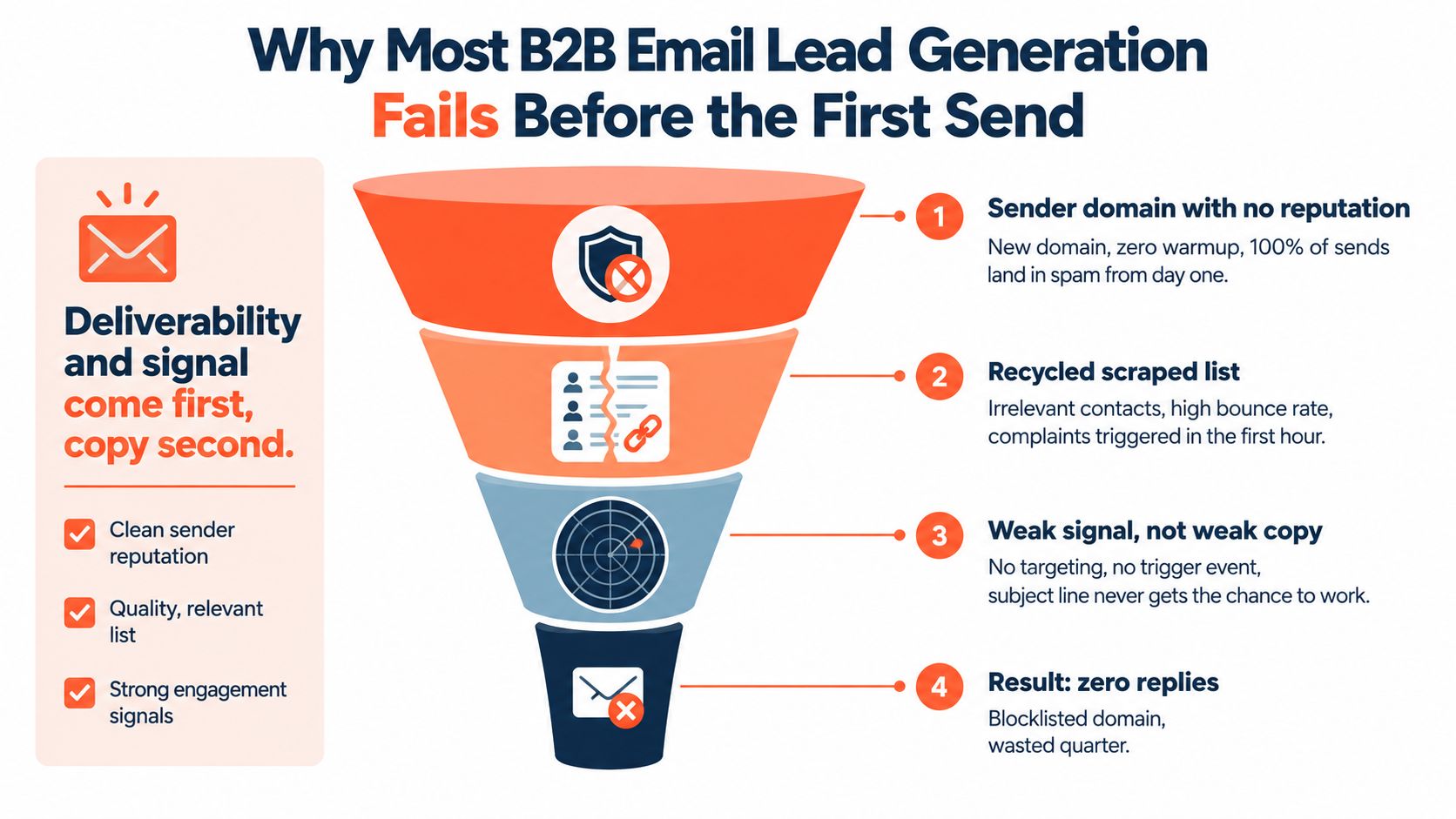
A B2B email lead generation campaign can fail before the first message leaves the mailbox. Weak prose is rarely the first problem. Poor infrastructure, unreliable contact data, and an offer that fits almost anyone usually decide the outcome earlier.
A common failure pattern is easy to recognise: a SaaS team buys a fresh domain, connects a sending platform, imports a recycled scrape, and sends 5,000 emails per day from one new domain. The domain has no sending history, the addresses have not been properly verified, and the message relies on generic personalization. Within a week, the team has damaged an asset needed for future campaigns. The volume is an operating example, not a benchmark, but the failure mode is common.
Practical rule: A subject line cannot rescue an email that is untrusted, unwanted, or irrelevant.
The three failure points
Unverified addresses create bounces and indicate weak database hygiene. Weak authentication gives mailbox providers less confidence that the sender is legitimate. Open-focused copy attracts curiosity without offering a sensible reason to reply. These failures sit in different parts of the system, so changing the subject line cannot repair all three.
Run a pre-send audit with three questions:
- Domain: Are SPF, DKIM, and DMARC configured, and has the domain established a controlled sending history?
- List: Has every address been verified, and can each contact be connected to a relevant account, role, or buying signal?
- Offer: Does the message propose a specific business outcome that this recipient could reasonably discuss now?
A campaign that fails any one of these checks needs correction before more copy testing. The wider deliverability dataset reports 83.1% inbox placement across global senders, with 16.9% of emails spammed, bounced, or blocked. Delivery is therefore an operating constraint, not a reporting detail.
The B2B email benchmark records average performance of 20.8% open rate, 3.2% click-through rate, 2% bounce rate, 0.24% unsubscribe rate, and 2.5% conversion rate. Treat those figures as context, not a target. Reply quality still depends on delivery, targeting, qualification, and the speed of response after a prospect engages.
For broader channel and funnel ideas, review Receiver lead generation resources. Cold email works as an operating system: authenticate the domain, verify the list, match signals to an offer, test message variants, sequence follow-ups, triage replies, and report on meetings booked. Better subject lines belong inside that system, not in its place.
Defining Your ICP and Building a Signal-Based List
A useful ideal customer profile starts with the commercial problem the product solves, not a job title. A VP Engineering at a fast-growing software company may be a strong prospect, while another VP Engineering at a stable business with no relevant project may be a poor one. Fit tells a team who could buy. Signals indicate when outreach may be welcome.
Begin with the account layer:
- Firmographics: Identify the industries, markets, business models, and operating conditions where the problem is expensive.
- Technology: Check whether the account uses systems your product replaces, complements, or connects with.
- Commercial context: Look for a sales motion and organisational structure that can support the proposed purchase.
- Exclusions: Remove companies with incompatible geographies, customer profiles, or procurement constraints.
Then add observable triggers. Funding announcements, leadership changes, hiring activity, product launches, site behaviour, and technology changes can all sharpen timing. A static list of every VP Engineering is a directory. A list of VP Engineering contacts at Series B SaaS companies that recently hired backend engineers is a working outbound hypothesis.
The signal should change the message. A hiring signal can support an angle about scaling delivery or reducing operational load. A stack change can support an integration or migration angle. A funding event may support a discussion about the next growth bottleneck. None of those signals guarantees buying intent, so the copy should treat them as a reason for relevance, not proof that the prospect is ready.
Build the list in layers
Research usually works better as a waterfall than as a single database export. Start with target accounts, identify likely buying roles, enrich missing business details, and verify each address before it enters a sending queue. Keep the evidence for the signal beside the contact record, including its source, date, and the angle it supports.
A tight list with strong evidence is more useful than a huge list with weak assumptions. The commonly suggested “800 versus 50,000” comparison is a useful qualitative principle, but no universal list-size ratio guarantees performance. Quality, freshness, and relevance should determine the next batch.
| Signal type | Example trigger | Outbound angle it unlocks |
|---|---|---|
| Hiring | New roles in a team tied to the problem | Support the team's changing workload |
| Leadership | A new executive joins the function | Discuss priorities likely to change |
| Technology | A relevant tool appears or disappears | Offer migration, integration, or efficiency context |
| Funding | A company announces new capital | Connect the offer to an expansion challenge |
| First-party intent | An account returns to relevant pages | Follow up with the topic already being researched |
For a deeper treatment of using intent data in segmentation and outreach, see Eludic's guide to intent-based targeting. The operating standard is straightforward: every contact should have a credible fit, a verified address, and a reason the message makes sense now.
Domains, Authentication, and Warming That Get You to the Inbox
Mailbox providers evaluate the sender before the recipient evaluates the offer. A healthy setup gives them consistent evidence that the messages are authorised, traceable, and sent at a controlled pace.
SPF identifies the servers allowed to send for a domain. DKIM attaches a cryptographic signature to the message, helping the receiving provider verify that the email wasn't altered in transit. DMARC tells providers how to handle messages that fail authentication and gives the domain owner visibility into abuse and alignment problems.
Run the technical sequence
A practical pre-launch order looks like this:
- Use a dedicated sending domain. The primary company domain shouldn't carry untested cold volume.
- Publish SPF, DKIM, and DMARC. The records need to align with the platform sending messages.
- Verify the records. Use reputable validator tools, then inspect message headers from test sends.
- Separate tracking carefully. Tracking domains can affect reputation, so they shouldn't be treated as an invisible implementation detail.
- Create mailbox-level controls. Set caps, monitor failures, and prevent one inbox from absorbing a sudden spike.
- Warm gradually. Start with low, human-looking activity and increase only when delivery and engagement remain healthy.
- Monitor before scaling. Pause when bounce or complaint patterns deteriorate.
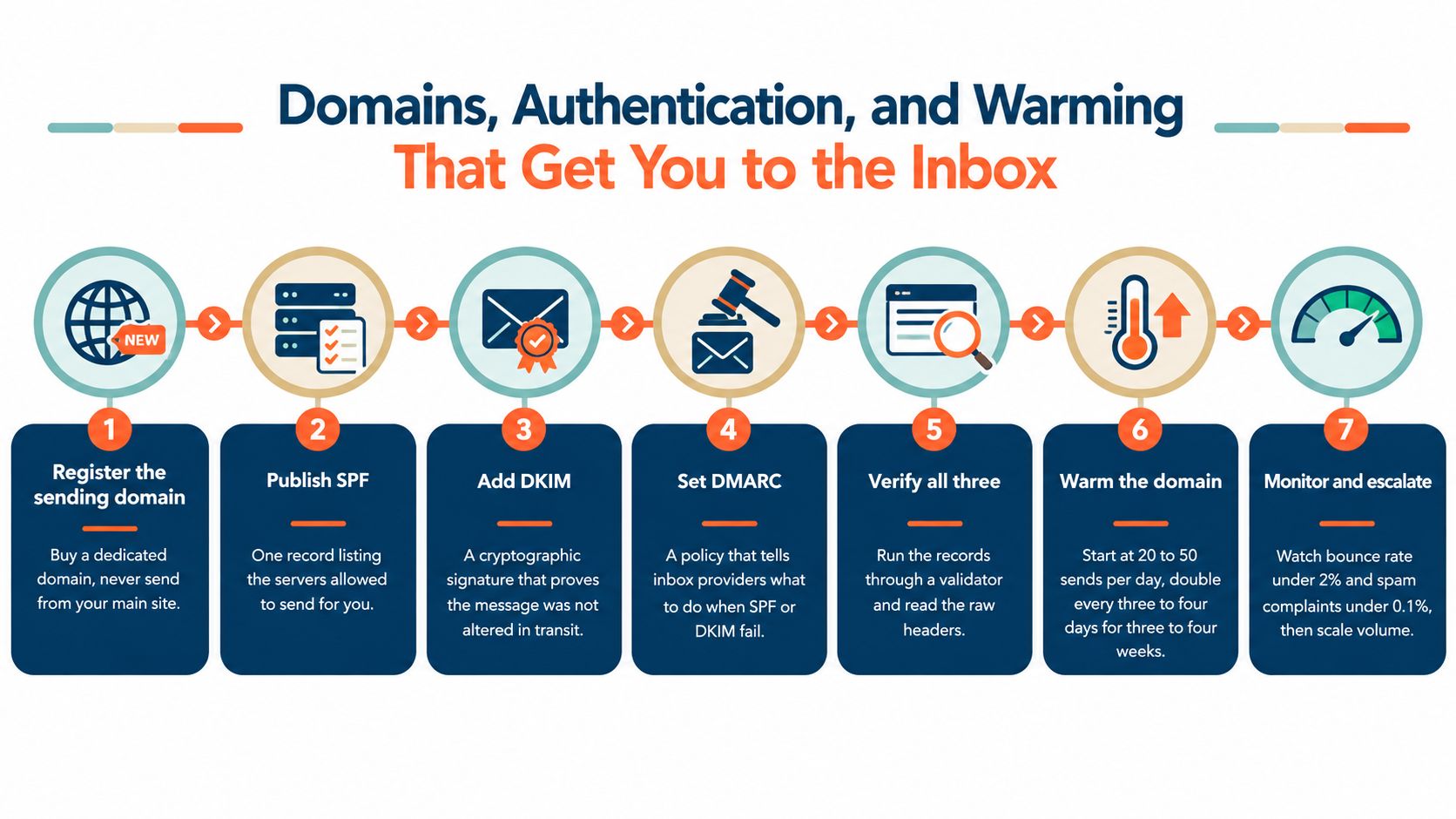
The practical methodology from Amplemarket's cold email benchmark guidance treats bounce rate as a gate. Keep it below 3%, with under 1.5% as the target, and keep spam complaints below 0.3%, ideally under 0.1%, before changing copy or increasing volume. The same guidance recommends inbox-placement tests across Gmail, Outlook, and Yahoo.
The warm-up schedule shouldn't be copied blindly from a tool dashboard. Providers commonly recommend beginning around 20 to 50 sends per day, then doubling every three to four days for three to four weeks, as shown in the visual above. Those are benchmark guidance figures, not a universal permission to scale. A domain that shows poor placement should stay at its current level or pause.
For an operational walkthrough, Eludic's email domain warm-up guide provides a useful reference. The sequence matters more than any individual record. Authentication without list hygiene still fails, and warming a domain before fixing the offer only gives a polished infrastructure to an irrelevant campaign.
Writing Multi-Variant Copy That Gets Replies
Cold email copy rarely fails because a sentence lacks creativity. It fails because the message does not connect a credible account signal to a problem the recipient may recognize. Personalization should therefore begin with research, not mail-merge fields. A first name, company name, or job title confirms formatting. A recent hiring decision, technology change, funding announcement, or observable business event gives the recipient a reason to believe the message was written for that account.
Consider a software company that recently posted several backend engineering roles. A weak opener might say:
“Hi {{first_name}}, companies like yours use our platform to improve engineering productivity. Would you be open to a quick demo?”
The usual tokens are present, but the message offers no evidence that the sender understands the account. A stronger version might say:
“Saw the new backend roles on the team. That usually creates pressure around onboarding, review capacity, and keeping delivery predictable. The platform helps engineering teams reduce that load without adding another planning layer.”
This version still needs validation. It does not claim to know the prospect's internal priorities. Instead, it connects an observable signal to a plausible problem and gives the recipient room to correct the assumption.
Three angles worth testing
Problem-agitation starts with a costly operational issue. Recent-trigger uses an event that changes timing. Peer-proof uses a relevant customer pattern or outcome, provided the proof is accurate and approved for use.
Build several subject lines for each angle while keeping the offer consistent. Otherwise, the test cannot separate the effect of the angle from a different CTA, audience, or proof point. Copy testing is useful only when the variables are controlled well enough to support a decision.
| Angle | Subject line variant | Opener hook | CTA style | Typical reply range |
|---|---|---|---|---|
| Problem-agitation | “Engineering review bottlenecks” | A specific operational friction | Low-friction question | Qualitative, varies by segment |
| Problem-agitation | “Keeping delivery predictable” | The cost of adding process | Two-option reply | Qualitative, varies by segment |
| Recent-trigger | “Saw the backend hiring” | A current hiring signal | Relevance check | Qualitative, varies by segment |
| Recent-trigger | “A question about the team” | A change that may affect priorities | Short reply ask | Qualitative, varies by segment |
| Peer-proof | “How similar teams handle this” | A verified pattern from a comparable account | Permission to share detail | Qualitative, varies by segment |
| Peer-proof | “Worth comparing notes?” | A narrow operational outcome | Conversation request | Qualitative, varies by segment |
Reply performance varies widely by market, list quality, sender reputation, and signal strength. That spread makes audience selection and deliverability more important than defending a favourite phrase. A polished email cannot compensate for weak account selection or poor inbox placement.
Use a reply CTA for an early cold touch more often than a calendar link. Once a prospect shows interest, offer one booking link or two concrete time windows to reduce friction. Teams looking for formats can review demo and nurturing email ideas, then rewrite the examples around the actual account signal rather than copying a template unchanged.
Sequencing, Automation, and Angle Testing
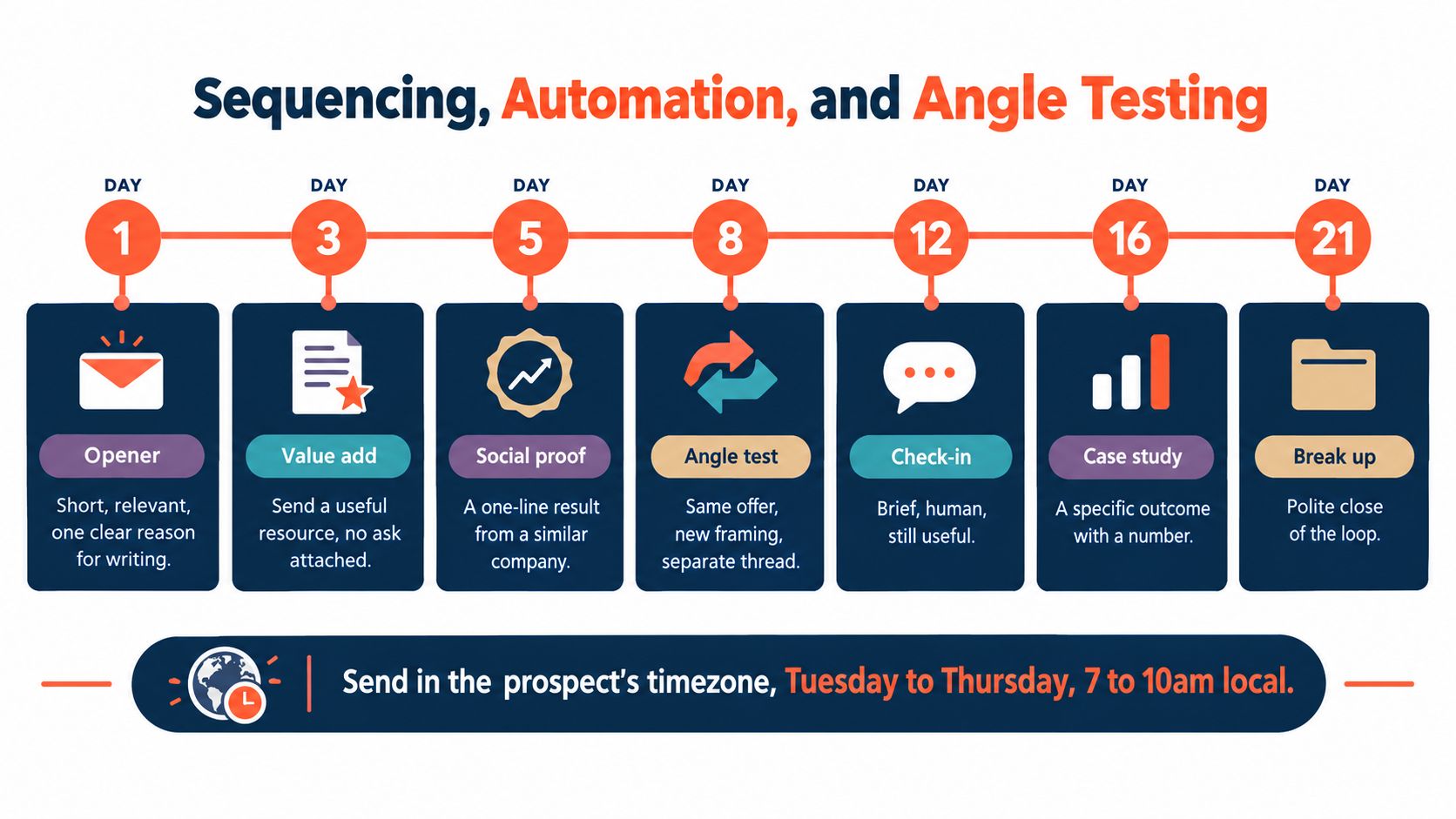
A sequence should create several credible reasons to reply, not repeat the same interruption with minor wording changes. A practical cadence uses five to seven touches over 14 to 21 days, with each message introducing a distinct reason to engage. The first email establishes relevance. A later touch might share a useful resource without an ask, followed by a verified peer example, a different framing of the same problem, a brief check-in, and a polite close. Schedule sends for the prospect's timezone.
Automate state changes, not judgment
Automation should prevent operational errors while leaving interpretation to a person:
- Reply detection: Remove a contact from every active sequence as soon as a reply arrives.
- Positive intent: Tag interested replies as warm and create a human follow-up task.
- Out of office: Pause the sequence and schedule a restart from the stated return date.
- Click activity: Treat clicks as a review signal, not automatic evidence of buying intent.
- Unsubscribe: Suppress the address across every campaign and CRM list immediately.
The Eludic email automation workflows guide can help map these state changes before they are built in a platform. Each workflow should make the operator's next action clear, while nuanced qualification remains human work.
Angle testing needs a stopping rule before launch. Test one audience, one offer, and one variable at a time. Retire a weak variant after 200 sends per cell when the campaign design supports that sample. This is an internal testing rule, not a guarantee of statistical certainty.
Log the signal, segment, subject line, opener, CTA, reply classification, objections, and decision to continue or pause. A shared learning document stops each campaign from repeating the same failed angle. If reply performance falls below about 1%, investigate targeting and deliverability before rewriting the copy again. Low replies often reflect weak signals, poor inbox placement, or an offer that does not fit the account, rather than a single defective sentence.
Reply Handling, Meeting Booking, and Compliance
A positive reply is not a reporting event. It's an operational handoff that can lose value if nobody owns the next response. Teams should categorise every reply within two hours, then apply a clear action rather than letting each representative improvise.
| Reply category | Immediate action | Target response |
|---|---|---|
| Interested | Confirm the problem and offer a booking link or time windows | 30 minutes |
| Objection | Answer briefly, then ask one clarifying question | 2 hours |
| Not now | Record the reason and schedule an appropriate follow-up | 24 hours |
| Wrong person | Ask who owns the problem and preserve the context | Same day |
| Unsubscribe | Suppress the contact across all systems | Immediate |
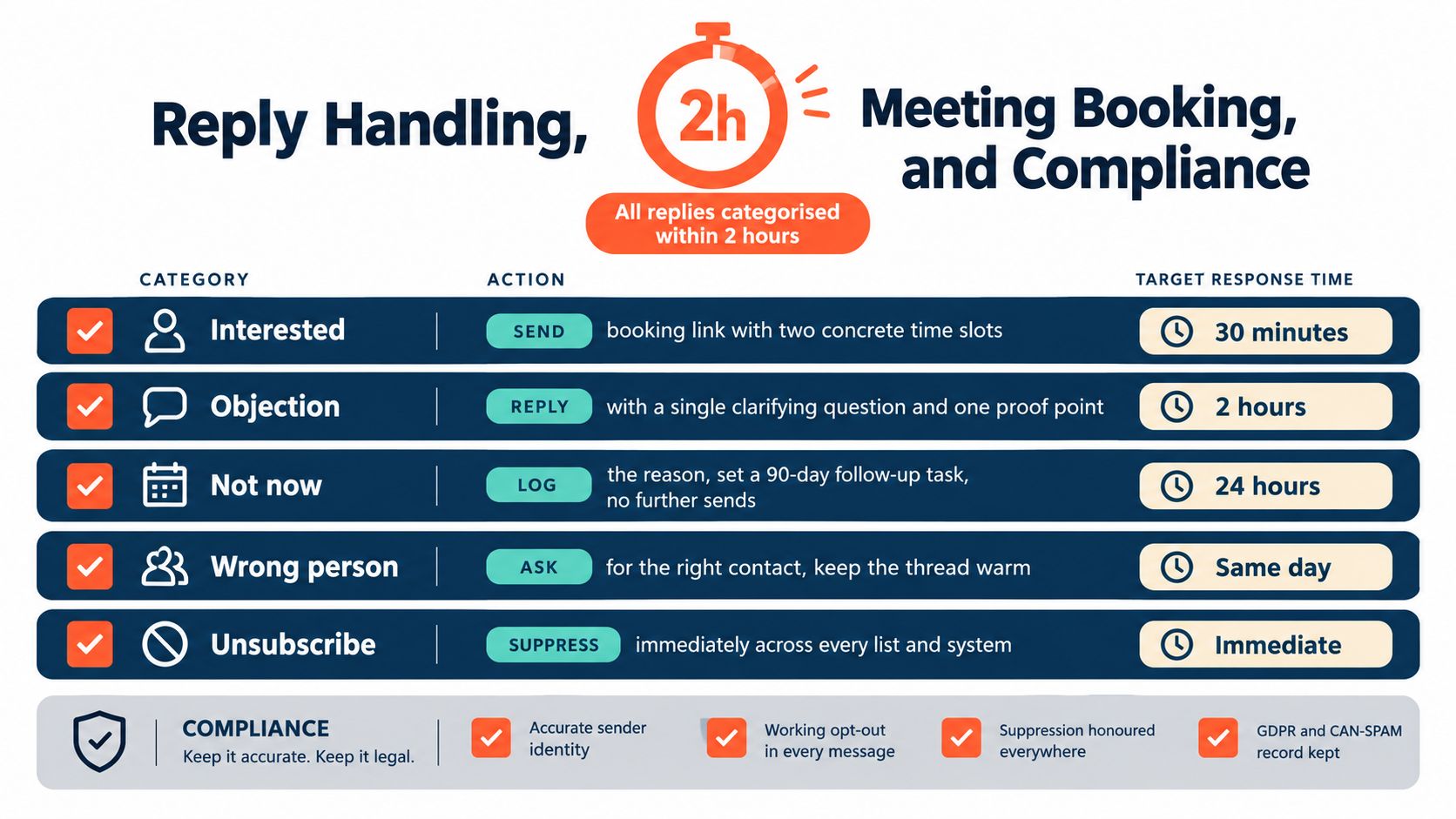
Booking works best as the second touch in the thread, after the prospect confirms some level of interest. The first reply should acknowledge their words and narrow the next step. A single calendar link or two specific time options is usually cleaner than dropping a booking page into the original cold message.
Compliance shouldn't be treated as a box checked at the end. It belongs in the campaign build:
- Sender identity: Use accurate sender and company information.
- Opt-out controls: Include a working unsubscribe mechanism in every relevant message.
- Suppression hygiene: Honour opt-outs across sending tools, CRM views, enrichment systems, and future uploads.
- Lawful basis: Document the GDPR basis for processing business contact data in the markets covered.
- Purchased data: Confirm the supplier's consent and usage terms before importing any purchased list.
- Audit trail: Retain records showing how contacts were sourced, contacted, and suppressed.
The team should review opt-outs, bounces, complaints, and message content periodically against current CAN-SPAM and GDPR requirements. Legal review may be appropriate for the company's jurisdictions and offer, especially where cold outreach involves sensitive markets or purchased data.
KPIs, Reporting, and a 7-Day Launch Checklist
Open rate is a diagnostic signal, not a dependable pipeline KPI. Apple Mail Privacy Protection and image blocking can inflate or suppress open data. Clicks can also reflect security scanning, curiosity, or interest in a resource that never becomes a sales conversation.
Build the dashboard around positive reply rate, qualified-meeting rate, opt-out rate, bounce rate, inbox placement, and cost per meeting booked. Revenue efficiency helps compare program economics, but benchmark performance depends on infrastructure and list quality. Treat any benchmark as directional, not as a promised return for each sender.
Read the metrics together
A high delivery rate with weak inbox placement usually points to filtering or reputation issues. Strong placement with few positive replies shifts attention to targeting, timing, or offer relevance. Positive replies that rarely become qualified meetings can indicate weak qualification, slow follow-up, or a message that does not match the sales process.
Use benchmark context to set an initial reference point. The broader B2B dataset reported a 2.5% conversion rate, a 3.2% click-through rate, and a 2% bounce rate, as noted earlier in VIB's benchmark summary. These figures can support diagnosis, but account-level results should determine decisions.
A useful weekly report shows performance by segment, active and paused angles, domains needing attention, reply categories, meetings booked, and eventual pipeline. Add cohort views that connect each campaign and its underlying signal to qualified opportunities and closed revenue. A reply is not automatically a sales outcome.
A practical seven-day launch checklist
Day 1: Define the ICP, exclusions, commercial problem, and qualification rules.
Day 2: Build the signal-based account list, enrich records, and verify addresses.
Day 3: Audit the sending domain, publish SPF, DKIM, and DMARC, and configure monitoring.
Day 4: Confirm the warm-up ramp, mailbox caps, inbox-placement tests, and complaint alerts.
Day 5: Write three angles, multiple subject lines, personalised openers, and reply-first CTAs.
Day 6: Build the sequence, reply routing, out-of-office logic, suppression handling, and calendar process.
Day 7: Review compliance, run final placement tests, activate the reporting dashboard, and launch only the approved segment.
Eludic provides a managed operating model covering domain authentication, warming, list research, multi-variant copy, angle testing, reply handling, calendar coordination, and compliance workflows. Teams outsourcing the infrastructure can visit Eludic to review the service and submit an initial brief.