
A founder can spend days refining a cold email sequence, reviewing the subject line, and checking the prospect list, only to find that the messages land in spam. The copy may be relevant, but receiving servers still need evidence that the sending infrastructure is authorized and that the visible sender domain matches the authenticated systems behind it.
That's the job of SPF, DKIM, and DMARC records. SPF identifies authorized sending hosts, DKIM adds a cryptographic signature, and DMARC connects those checks to the domain recipients see. The important detail is that a published record isn't automatically a working setup. Alignment, selector stability, provider changes, forwarding, and reporting all determine whether authentication helps or fails.
Why SPF DKIM and DMARC Decide Inbox Placement
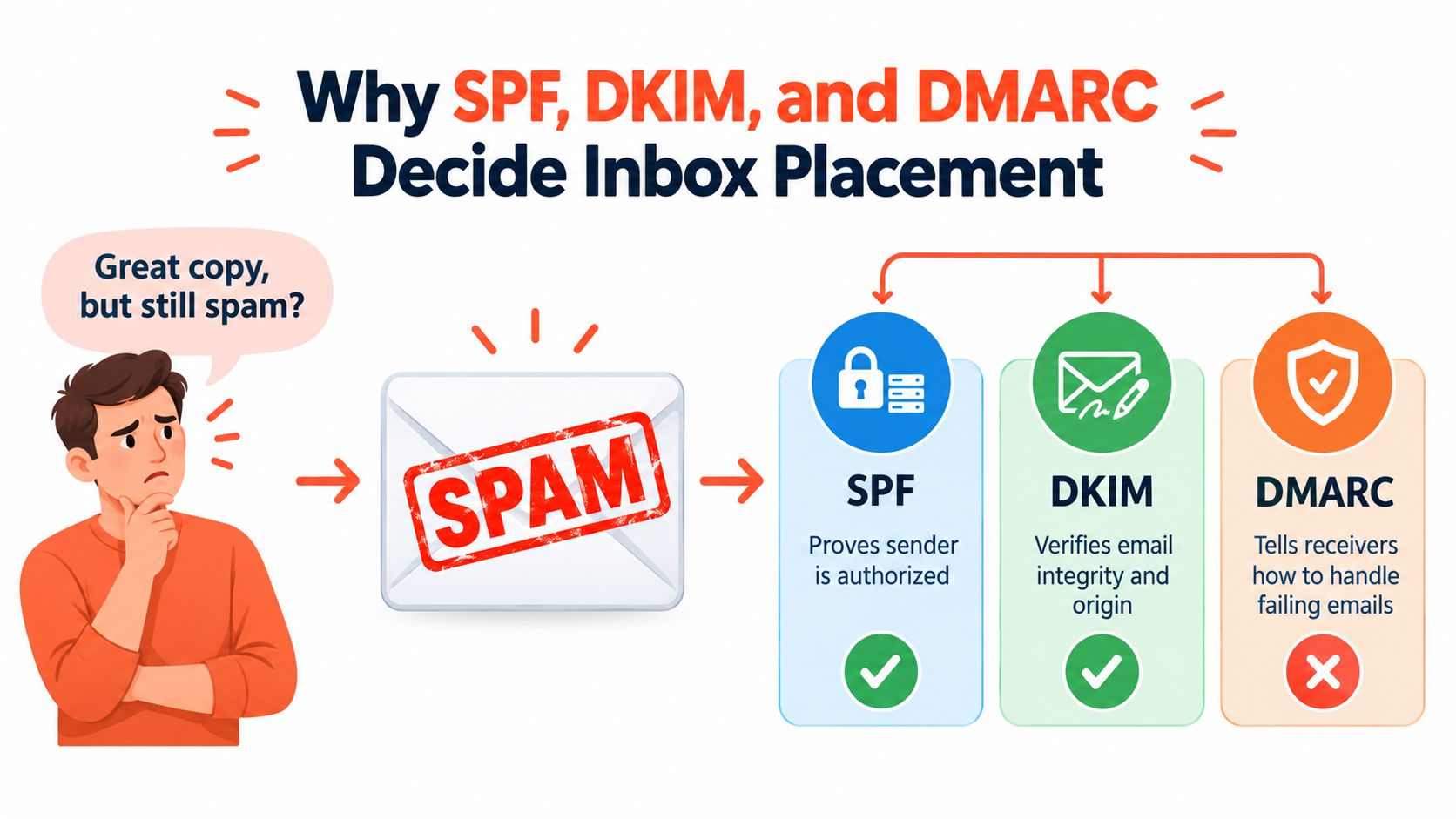
SPF, DKIM, and DMARC each answer a different question during message evaluation.
SPF asks whether the sending server is authorized for the envelope-from or return-path domain. The domain owner publishes a DNS policy listing approved sending services, and the receiving server compares that policy with the system that delivered the message.
DKIM asks whether the message carries a valid signature from an authorized domain and whether signed content remains intact. The sending platform uses a private key, while the matching public key sits in DNS. A receiver can then validate the signature without trusting the sending IP alone.
DMARC asks whether either authentication result aligns with the visible From domain, then applies the domain owner's preferred handling policy. That policy can monitor failures, send them to quarantine, or reject them.
A message can pass SPF and still fail DMARC if the authenticated envelope-from domain doesn't align with the visible From domain. The same applies to DKIM. A valid signature from a vendor's domain isn't enough if the DKIM signing domain doesn't align with the domain shown to the recipient.
That distinction explains why adding an SPF include often doesn't repair inbox placement. SPF can authorize a platform while leaving DKIM unstable or misaligned. For cold email programs using several sending tools, stable DKIM signing and visible-domain alignment are usually more useful operational targets than SPF pass alone.
Teams reviewing sender setup should also separate authentication from broader deliverability. Authentication proves that the infrastructure has permission to send. Deliverability depends on how recipients and mailbox providers evaluate the message, domain, sending behavior, and reputation. The distinction is covered in more detail in this guide to email deliverability.
A practical inbox setup also includes checking the surrounding sending environment, including mailbox configuration and provider behavior. Teams building that foundation can browse inbox docs for additional operational guidance.
By the end of a sound implementation, the domain should have one coherent SPF policy, a reliable DKIM signature for every legitimate sender, and a DMARC record that starts in observation mode. That sequence lets a team identify hidden senders, correct alignment, and enforce policy without taking legitimate mail out of circulation.
How SPF DKIM and DMARC Records Work Under the Hood
SPF lives in a TXT record at the sending domain. A minimal pattern looks like this:
v=spf1 include:sender.example ~all
The v=spf1 mechanism identifies the record as SPF. An include: authorizes another domain's SPF policy, usually one controlled by an email service provider. An ip4: mechanism can authorize a specific sending network when a provider gives one. The final ~all applies a soft-fail result to sources not otherwise authorized. Some organizations use -all for a hard fail, but the right ending depends on whether every legitimate sender has been identified and tested.
SPF evaluates the envelope-from domain, not necessarily the address displayed in the recipient's From field. That difference is the source of many DMARC alignment failures.
DKIM uses a selector to identify the public key. A provider may publish a record at a name such as selector._domainkey.example.com, with content resembling:
v=DKIM1; k=rsa; p=PUBLIC_KEY_VALUE
The sender signs selected headers and message content with the private key. The receiver reads the DKIM-Signature header, uses the selector and signing domain to find the public key, and validates the result. A selector mismatch, missing key, changed signing domain, or message modification can produce a DKIM failure.
DMARC lives at _dmarc.example.com. A monitoring record can look like this:
v=DMARC1; p=none; rua=mailto:[email protected]; pct=100
p=none requests monitoring without enforcement. rua defines where aggregate reports should go, and the mailto: prefix matters. pct controls the portion of messages to which the policy applies. Alignment can be relaxed or strict, depending on the adkim and aspf tags and the organization's chosen policy.
The evaluation sequence
A receiver generally records SPF and DKIM results, then checks whether at least one passing mechanism aligns with the visible From domain. DMARC can pass when either SPF or DKIM passes with alignment. That means a DKIM pass from the correct domain can preserve DMARC authentication even when forwarding changes the SPF path.
The historical development explains the division of labor. SPF first appeared as an early draft in 2003 and became RFC 4408 in April 2006. DKIM grew from DomainKeys work in 2004 and became RFC 4871 in 2007. RFC 5451 standardized the Authentication-Results header in 2009, giving receivers a consistent place to record authentication outcomes. DMARC followed in March 2015 as RFC 7489, adding policy, reporting, and alignment.
| Record | DNS location | What it proves | Failure signal |
|---|---|---|---|
| SPF | Sending domain TXT record | The envelope-from sending host is authorized | spf=fail, softfail, or permerror |
| DKIM | Selector TXT record under _domainkey | The signature validates and signed content remains intact | dkim=fail or a missing public key |
| DMARC | _dmarc TXT record | SPF or DKIM passed with alignment, according to policy | dmarc=fail |
Publishing Your Records Without Breaking Mail Flow
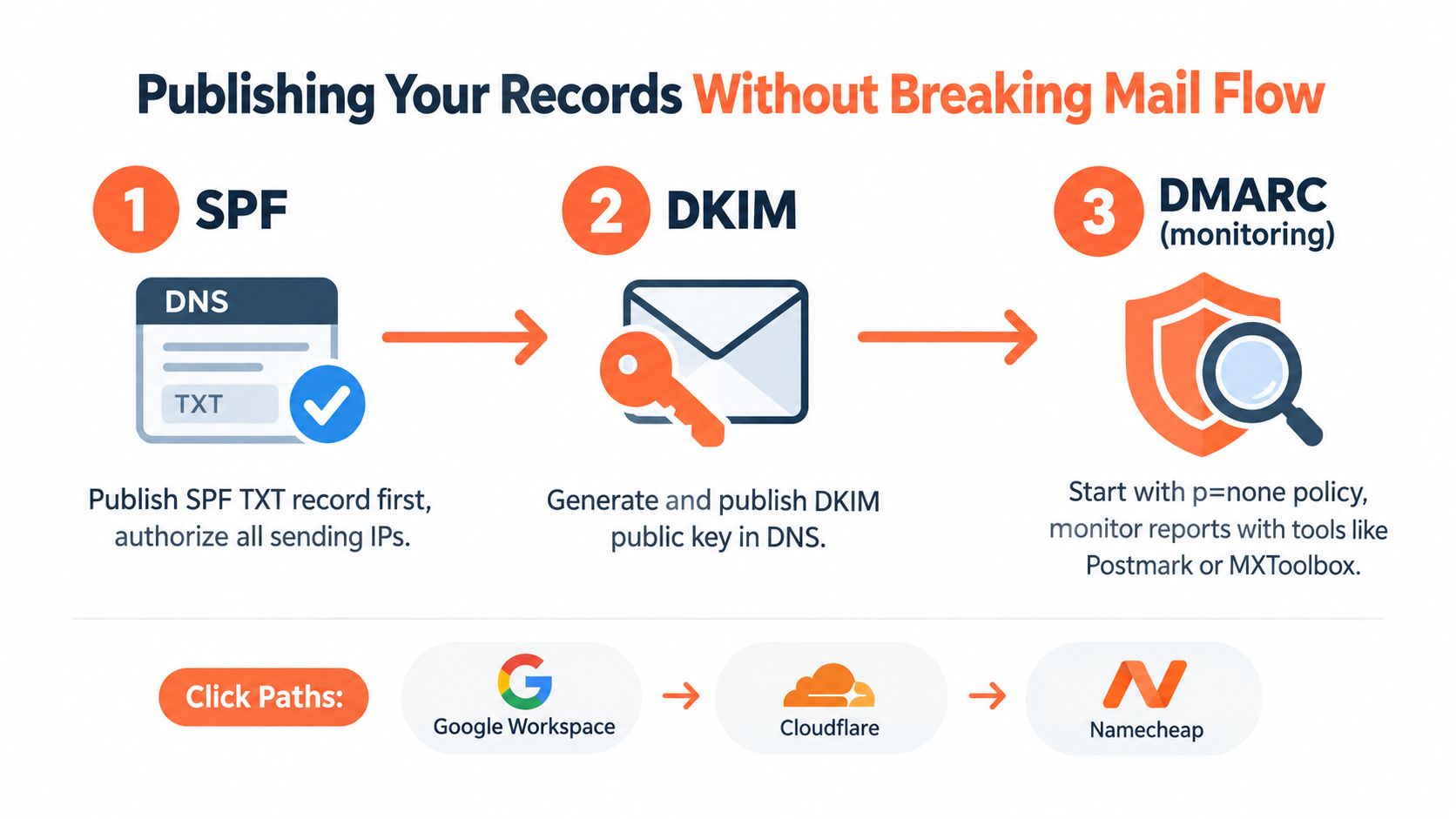
A new cold email domain can look ready in the DNS console while one vendor still uses the wrong return path or DKIM domain. Roll out authentication in a controlled order: SPF first, DKIM second, and DMARC in monitoring mode. This lets each sending system prove its configuration before DMARC enforcement can affect delivery. The main deliverability lever is stable, aligned DKIM. SPF authorizes the sending path, while DKIM preserves authentication when forwarding or vendor routing changes that path.
Start with one SPF policy
Inventory every legitimate sender before editing DNS. Include Google Workspace or Microsoft 365 for employee mail, the cold email platform, CRM, support desk, transactional provider, and marketing platform. Combine their official mechanisms in one SPF TXT record.
A single-provider pattern might look like:
v=spf1 include:provider.example ~all
A multi-sender pattern might look like:
v=spf1 include:workspace.example include:outbound.example include:crm.example ~all
These domains are placeholders. Copy each provider's published include value. Do not guess a hostname. Multiple SPF TXT records at one domain cannot be evaluated as one policy, so merge the mechanisms into a single record instead of publishing them side by side.
In Cloudflare, open DNS, choose Add record, select TXT, and use the root domain as the host. GoDaddy uses Manage DNS, then Add under Records. Google Workspace and Microsoft 365 usually display the required SPF and DKIM values in their administrator consoles, but publication still happens at the DNS host that controls the domain.
Turn on DKIM for every sender
Once SPF is published, enable DKIM separately in every sending platform. Google Workspace exposes the setting under Gmail authentication in the Admin console. Microsoft 365 provides DKIM configuration in the Defender or security administration area, where the tenant supplies selector records.
Cold email platforms often generate a selector and public key automatically. The DNS host usually follows this pattern:
selector._domainkey
Use the provider's exact value. A public key may be long enough for a DNS interface to wrap across several display lines, but the stored value must remain intact. After propagation, the platform should report that signing is enabled. A delivered message remains the stronger check because it shows the selector and d= domain that receivers saw.
DKIM needs extra care when several vendors send through one domain. Give each vendor a distinct selector, document its owner, and keep old selectors available until queued or routed messages stop using them. Removing a selector too early creates avoidable dkim=fail results. Teams that need shared inventory, selector ownership, and report review can use Eludic's email authentication service.
Add DMARC only in monitoring mode
Start with:
v=DMARC1; p=none; rua=mailto:[email protected]
Send aggregate reports to an address the team monitors or to a service that can parse XML. The mailto: prefix is part of the syntax. Check that the visible From domain aligns with the authenticated SPF domain or the DKIM d= domain, based on the selected alignment mode.
Before changing policy, send test messages from every legitimate platform. Inspect the headers, record the authenticated domain, and confirm that it aligns with the address recipients see. Moving directly to p=reject can block legitimate mail because forwarding, mailing lists, and vendor routing may change authentication after the original sender hands off the message.
Practical rule: Add one sending platform, inspect its real headers, then add the next. DNS can look correct while a provider signs with a different domain.
How to Verify SPF DKIM and DMARC Are Actually Passing
Verification shouldn't happen only on launch day. A new vendor, changed return path, rotated selector, or altered routing rule can change authentication without touching the DNS console. The useful question isn't “Are the records published?” It's “What did the receiver record for an actual message?”
Check the raw DNS response
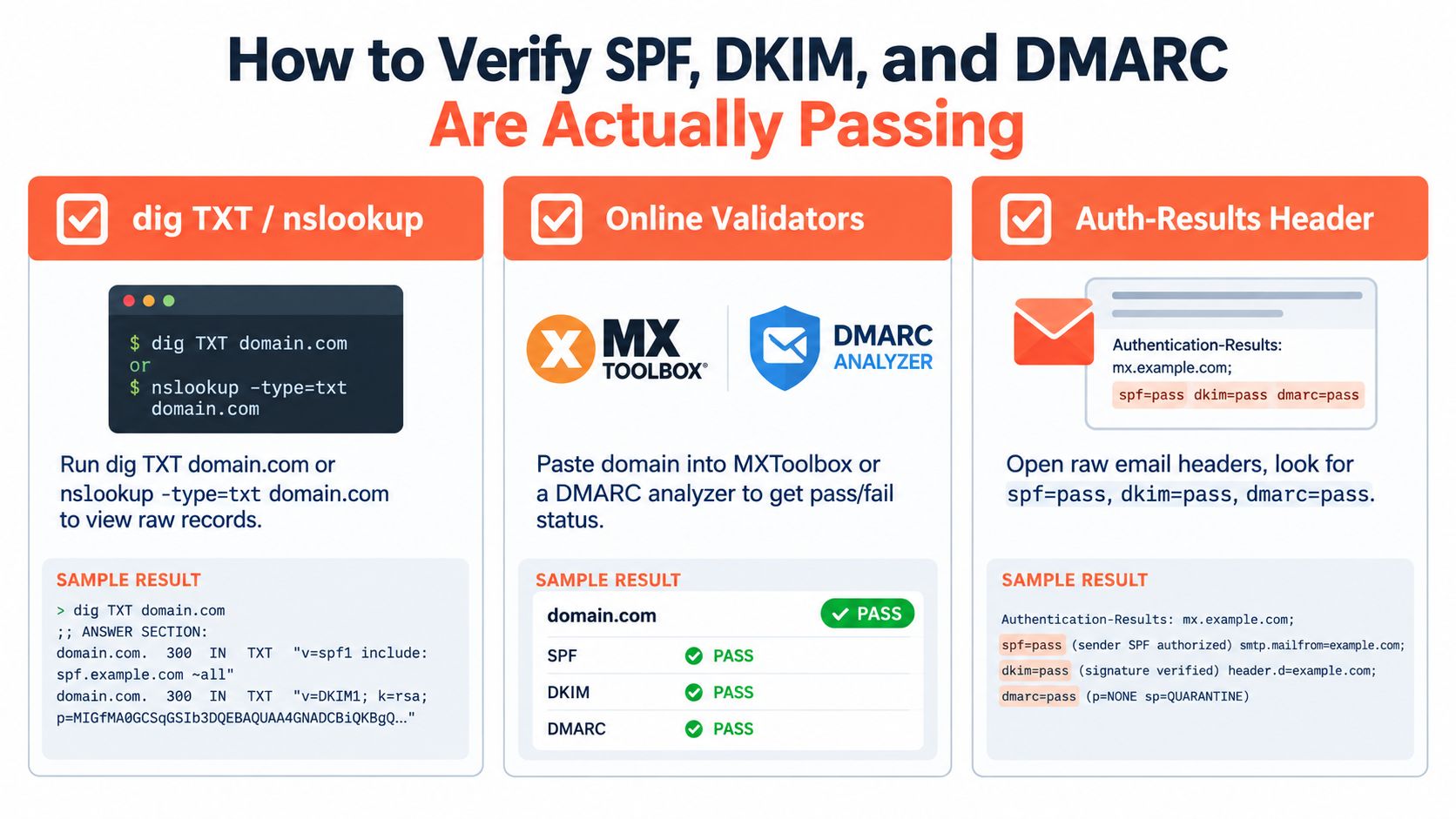
A DNS lookup shows what the public internet can retrieve. For SPF, inspect the root-domain TXT response. For DKIM, query the exact selector host generated by the sending provider. For DMARC, query _dmarc at the domain.
The result should contain one coherent SPF policy, the expected DKIM public key, and a DMARC policy with valid tags. A validator such as MXToolbox or a DMARC analyzer can catch syntax problems, but those tools don't replace a delivered-message test. They can't always reveal that one provider is using an unexpected envelope-from or DKIM signing domain.
Read Authentication-Results
In Gmail, open a delivered message, select the menu beside the reply action, and open the original or raw message. Search for an Authentication-Results header. A healthy message may show:
spf=passdkim=passdmarc=pass
The domains beside those results matter. An SPF pass for a provider-owned return path may not align with the visible From domain. Likewise, DKIM may pass while signing with a platform domain rather than the brand domain. In either case, the mechanism can pass while DMARC fails.
NIST's analysis describes the critical condition clearly: DMARC succeeds when either SPF or DKIM passes with alignment, which is why forwarding, mailing lists, SRS rewriting, and multiple ESPs can disrupt DMARC even when the underlying records appear configured. For a practical walkthrough of the testing process, teams can use this SPF, DKIM, and DMARC test guide.
Monitor reports and operational rates
Aggregate DMARC reports reveal which systems send mail for the domain, which mechanisms pass, and which sources fail alignment. They're especially valuable for finding forgotten SaaS tools and unauthorized infrastructure that a DNS review won't expose.
Global coverage remains incomplete. Fortra reported that 36.7% of the top 10 million domains had a syntactically valid SPF record, 61.9% had no SPF record, and 81.6% lacked a DMARC record in its benchmark data (Fortra's adoption analysis). Those figures describe published authentication coverage, not inbox placement, but they show why a domain's own test results need regular review.
For outbound operations, pass rates should stay near 100%. Modern deliverability guidance treats anything below 98% as weak, so a declining rate deserves investigation before enforcement changes.
Troubleshooting Common SPF DKIM and DMARC Failures
A cold email domain can look correctly configured in DNS while messages still fail authentication. Start with the exact result in the validator or Authentication-Results header, then trace it to the sending platform, selector, or domain that produced it. DKIM stability deserves priority here. A stable selector and aligned signing domain often preserve DMARC when vendors change return paths.
SPF failures
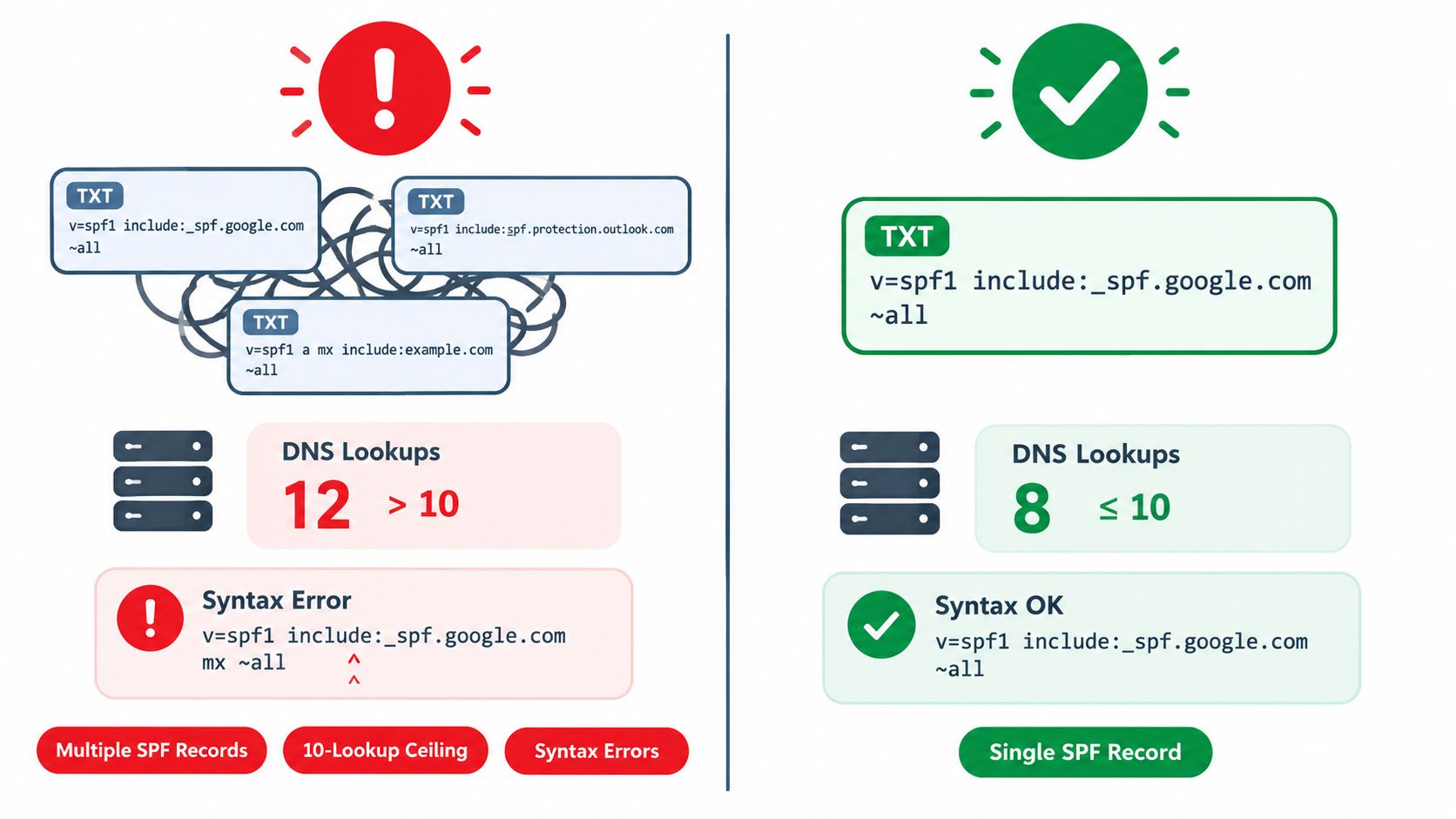
Multiple SPF records: Publishing separate SPF TXT records for different vendors does not make authorization additive. Receivers may return a permanent error instead of combining them. Fix: merge every authorized mechanism into one record.
Too many DNS lookups: Nested include statements expand into additional DNS queries. SPF permits a 10-DNS-lookup ceiling. Fortra's benchmark data found that 1.1% of domains exceeded it, while 1.4% had syntax errors or excessive lookups (Fortra's benchmark data). Fix: remove inactive senders, eliminate duplicate includes, and ask providers whether they support a flatter authorization path.
Broken syntax: A copied include can contain an extra character, an invalid mechanism, or a line break that the DNS host interprets incorrectly. Fix: validate the final public record, not only the value pasted into the DNS console.
DKIM failures
A DKIM failure commonly comes from a selector mismatch. The sender's DKIM-Signature header names one selector, while DNS publishes another, or the provider continues using a selector from an older setup. Fix: copy the selector from an actual message header and query that exact host, usually in the form selector._domainkey.example.com.
Key rotation can create a temporary gap. If a platform signs with a new selector before its public key is available, verification fails until DNS contains the matching record. Fix: publish and verify the new public key before activating the new signing key. Keep the old selector published until messages using it have stopped.
DMARC failures
Missing report destination prefix: A record uses [email protected] instead of rua=mailto:[email protected]. Fix: add mailto: and validate the record again.
Misplaced policy tag: The p= tag is malformed or embedded inside another value. Fix: rewrite the record with clean, semicolon-separated tags.
Alignment failure after a pass: SPF passes for the return-path domain, but that domain differs from the visible From domain. DKIM may pass with a vendor-owned d= domain while DMARC still fails alignment. Fix: configure a custom return path and custom DKIM signing domain, then test a real message from every sending platform.
Forwarding and mailing lists can rewrite the envelope sender or alter signed content. SRS may preserve SPF through some forwarding paths, yet alignment still requires testing. Multiple ESPs create the same problem when each uses different domains. DNS can be technically correct while the recipient evaluates the message as a DMARC failure.
Moving to Enforcement and Keeping Deliverability High
DMARC enforcement should follow evidence, not optimism. Start with p=none, review aggregate reports, identify every legitimate sender, and correct alignment failures. After stable traffic shows that legitimate messages authenticate consistently, move to p=quarantine, then progress toward p=reject. The pct tag can support a controlled rollout, while a subdomain policy helps prevent unreviewed child domains from inheriting an unsuitable posture.
DKIM stability deserves priority during that process. Cloudflare Radar-based 2026 figures showed DKIM passing on 90.90% of messages compared with 80.24% for SPF, while SPF failed on 14.54% compared with 1.67% for DKIM (Adaptive Security's alignment analysis). The figures don't make SPF optional. They reinforce the practical point that consistent DKIM signing and strict alignment can provide a more dependable DMARC path when return paths change.
A maintenance checklist should include:
- New senders: Add each platform to the inventory before it sends from the domain.
- DKIM selectors: Track ownership, activation, and retirement so rotations don't create gaps.
- DMARC reports: Review unknown sources and alignment failures regularly.
- Pass rates: Treat anything below 98% as an early warning, based on the deliverability benchmark cited above.
- Policy changes: Move from monitoring to quarantine or reject only after legitimate traffic has been verified.
Eludic configures SPF, DKIM, and DMARC for managed cold email domains, then operates authentication, inbox warming, reputation monitoring, compliance, sending, and reply handling as part of its done-for-you outbound service. Teams that want this infrastructure handled instead of maintained manually can visit Eludic to start with a short brief.