

A sales team can spend weeks rewriting subject lines while the actual problem sits in DNS. Open rates remain flat, bounce reports look confusing, and someone suggests sending more aggressively to “wake up” the domain. Then a technical audit finds that an authentication record is broken, a recent list upload contains bad addresses, or messages are reaching recipient servers but landing in spam.
That pattern is common because email deliverability issues are often treated as copy problems when they're really measurement and operations problems. The practical order is simple: measure inbox placement, inspect authentication, review sending behaviour, clean the list, and only then adjust copy or frequency.
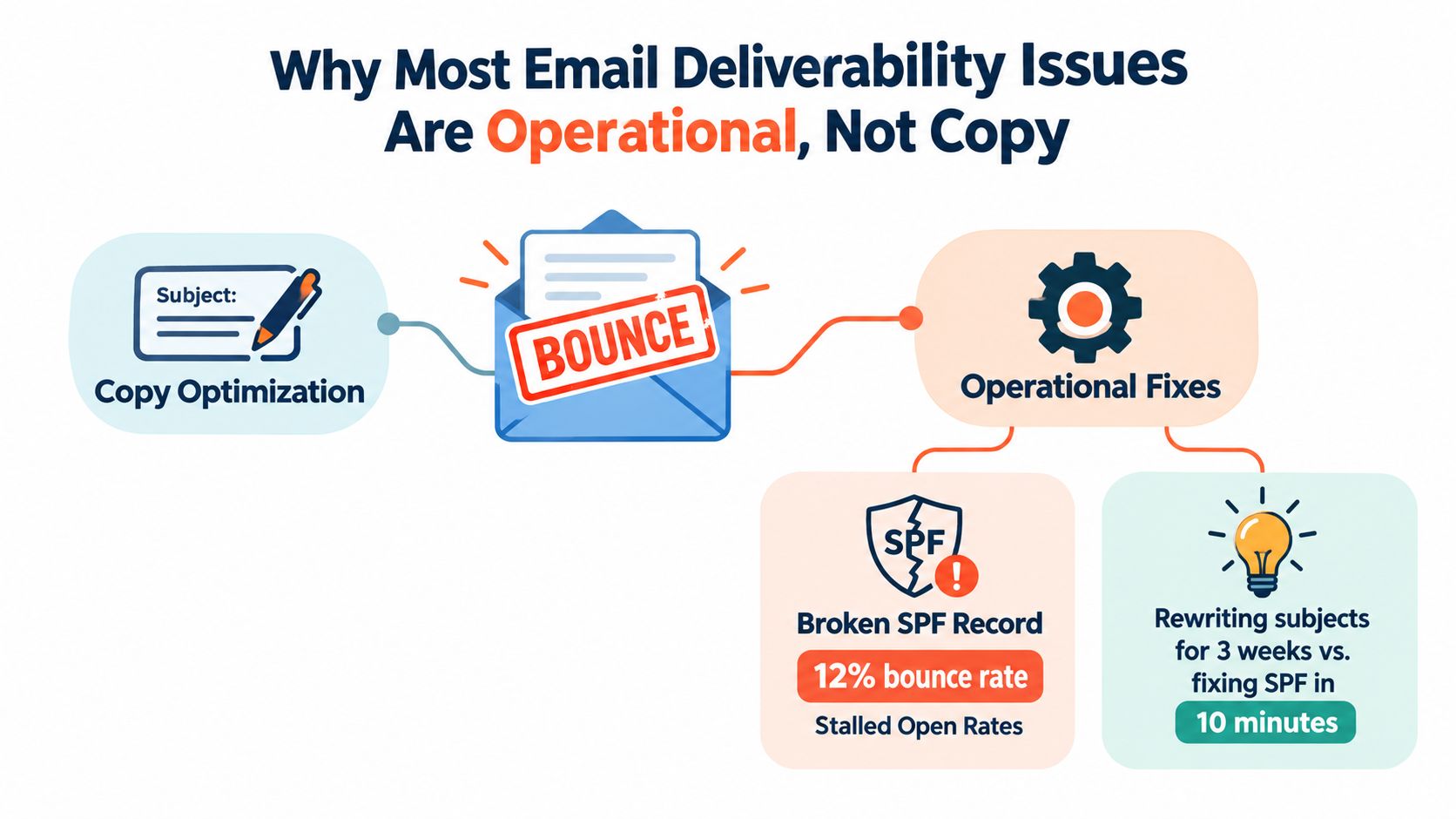
Why Most Email Deliverability Issues Are Operational, Not Copy
Subject lines matter, but they rarely explain a sudden, widespread placement failure. Mailbox providers evaluate a broader set of signals, including whether the sending domain is authenticated, whether recipients interact with messages, whether addresses are valid, and whether the sender behaves consistently over time.
A team can rewrite every subject line and still lose inbox access if its SPF record is invalid, DKIM signing is missing, or complaint alerts go unnoticed. Copy optimization is useful after the sending system is healthy. It isn't a substitute for a working sending system.
The latest Validity benchmark report gives a useful reference point. Its 2025 figures put worldwide inbox placement at 87.2%, with 6.7% of messages going to spam and 9.8% missing entirely. In practical terms, roughly one in six legitimate emails still failed to reach the inbox. The earlier edition reported 84.8% inbox placement, 6.1% spam placement, and 9.1% missing messages.
The operational categories that move placement
A useful audit separates the problem into distinct working areas:
- Authentication: SPF, DKIM, and DMARC tell mailbox providers whether the sender is authorized and aligned with the visible From domain.
- Infrastructure: Sending domains, IP reputation, reverse DNS, tracking domains, and provider configuration all shape trust.
- List quality: Invalid, stale, role-based, or unconsented addresses create bounces and complaints.
- Sending patterns: Sudden volume spikes and irregular bursts look different from stable, expected traffic.
- Engagement: Replies, clicks, deletes, spam reports, and continued inactivity help providers decide whether mail is wanted.
- Monitoring: Postmaster dashboards, seed tests, blocklist checks, and alerts expose failures before a campaign becomes a crisis.
Practical rule: Don't change the copy until the team can explain where messages are going, which providers are filtering them, and what changed before the decline.
The diagnostic sequence should therefore run measurement first, infrastructure second, list and sending behaviour third, and content last. That order prevents a team from “fixing” a subject line while an authentication failure or poor data source continues to damage the domain.
Measure Inbox Placement Before You Change Anything
The first distinction is between delivery rate and inbox placement rate. Delivery rate measures messages accepted by recipient servers:
delivery rate = (emails delivered ÷ emails sent) × 100
Inbox placement rate measures messages that arrive in the inbox after acceptance:
inbox placement rate = (emails in inbox ÷ emails delivered) × 100
A campaign can therefore show a healthy delivery rate while a large share of accepted messages sits in spam or disappears from view. Recent benchmark reporting places large-scale global inbox placement around 83.5% to 84%, with approximately 6.7% going to spam and 9.8% missing, as summarized by MailTester's inbox placement statistics.
Run four checks before making changes
- Google Postmaster Tools: Review domain reputation, IP reputation, spam rate, authentication, and delivery errors where data is available. A reputation decline gives stronger direction than a weak open rate alone.
- Microsoft SNDS: Check Microsoft-related complaint and reputation signals for Outlook.com traffic. Gmail and Microsoft can react differently, so one provider's healthy result doesn't clear the whole program.
- Seed testing: Send controlled messages to test inboxes at Gmail, Outlook, and Yahoo. Tools such as GlockApps or Inboxalytics can show whether a message reaches the inbox, spam folder, or is missing.
- ESP dashboards: Review hard bounces, soft bounces, complaints, blocked messages, and provider-level errors. A sudden change should be matched against recent uploads, volume changes, or authentication edits.
Teams that need a broader practical explanation of the recovery process can use this guide on how to stop emails from failing. For a repeatable testing workflow, the email deliverability testing guide is a useful companion.
| Measurement Source | What It Shows | Action Threshold |
|---|---|---|
| Google Postmaster Tools | Domain and IP reputation, spam signals, authentication trends | Spam complaint rate above 0.1% warrants intervention, based on the Unspam deliverability benchmark guidance |
| Microsoft SNDS | Microsoft sender and complaint signals | Investigate provider-specific deterioration before increasing volume |
| Seed testing | Inbox, spam, or missing placement across major mailbox providers | Inbox placement below 85% warrants intervention |
| ESP dashboard | Delivery, bounce, complaint, block, and provider error patterns | Bounce rate above 2% warrants investigation |
| Change log | Correlation with uploads, volume spikes, or DNS changes | Triage any decline that follows a material sending change |
Keep a weekly baseline with the sending domain, providers tested, sent volume, delivered volume, delivery rate, inbox placement, hard bounces, soft bounces, complaints, blocklist status, authentication results, and notable changes. Without that snapshot, every incident becomes a debate about opinions rather than a comparison against evidence.
Audit and Fix SPF, DKIM, and DMARC the Right Way
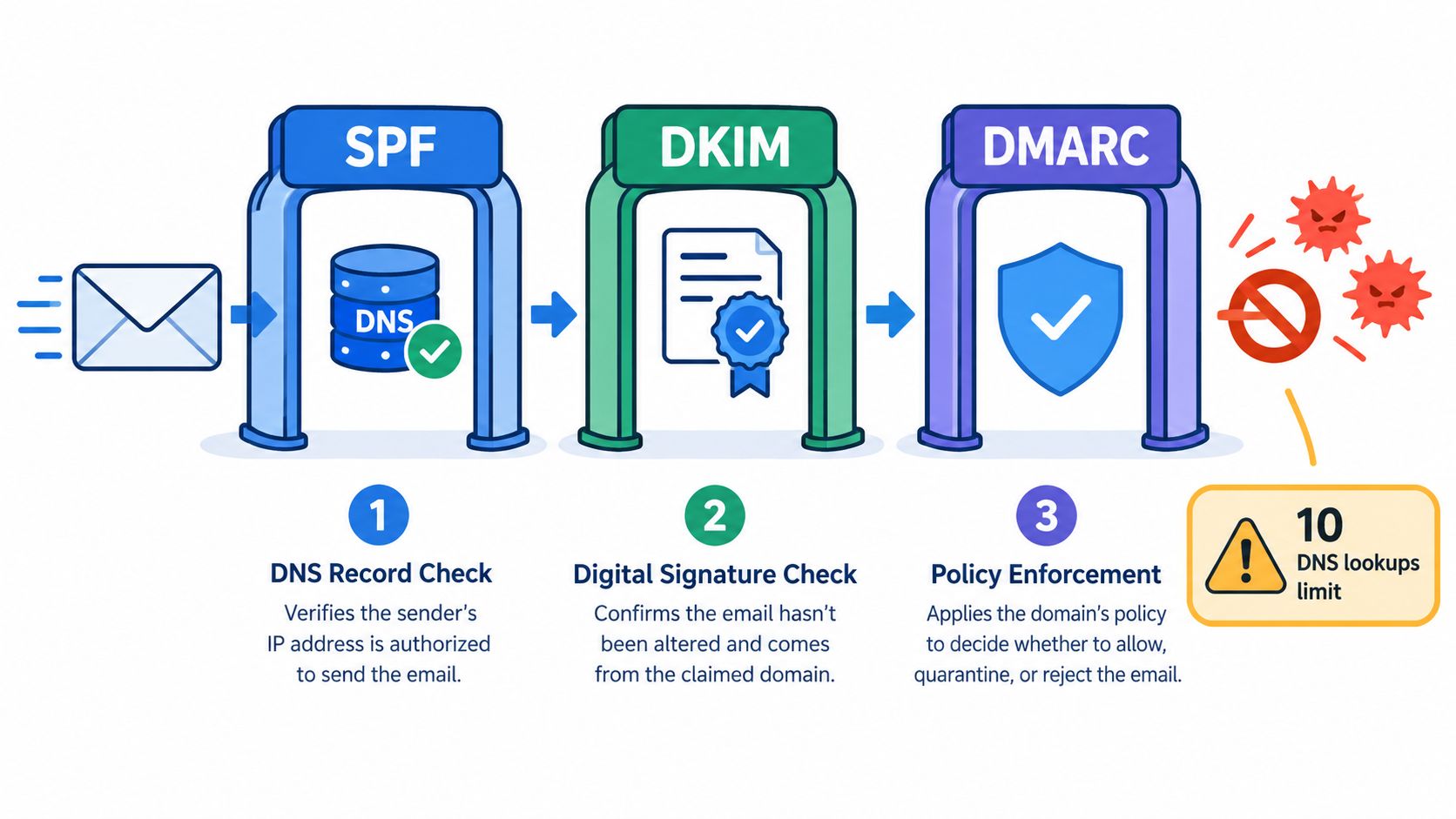
Authentication should be audited in sequence, not treated as a single checkbox. The sender needs valid records, correct alignment, and reporting that reveals which services are sending on the domain's behalf.
Start with SPF and DKIM
SPF is a DNS TXT record that identifies authorized sending services. The most common failure is a fragmented setup with multiple SPF records, stale vendor entries, or nested include chains that exceed the 10-DNS-lookup limit. A CRM, ESP, support platform, and transactional provider can consume that allowance quickly, especially when each provider references additional records.
DKIM adds a cryptographic signature to messages. Each sending service should sign with a valid selector and a strong key, commonly 2048-bit. The receiving provider must be able to find the public key, validate the signature, and confirm that the signing domain aligns with the visible From domain. MXToolbox and dkimvalidator can help verify the record and signature, but raw message headers remain the final check.
A practical review checks every service that sends mail, including marketing platforms, CRMs, support systems, billing tools, and employee mailboxes. Removing an old vendor from SPF without checking whether it still sends can create a new failure, while leaving unknown vendors authorized expands the attack surface.
Use DMARC for alignment and visibility
DMARC checks whether SPF or DKIM passes and aligns with the domain shown in the From header. Relaxed alignment allows related organizational domains, while strict alignment requires a closer match. The policy options are:
- p=none: Monitor and report. It doesn't enforce a delivery action.
- p=quarantine: Ask receiving providers to treat failures as suspicious or spam.
- p=reject: Ask receiving providers to reject failures.
Mailgun's 2025 deliverability research found DMARC implementation among surveyed senders at nearly 54%, compared with less than 43% in 2023, as reported in its State of Email Deliverability findings. Separate testing summarized by Unspam found adoption moving from 59% in 2025 to 48% in 2026, which shows that implementation remains uneven rather than guaranteed across the market.
The safe rollout is straightforward:
- Check SPF, DKIM, and DMARC records.
- Validate SPF and DKIM alignment against the visible From domain.
- Publish DMARC with
p=noneand a reporting address. - Review aggregate reports for at least two weeks.
- Fix unidentified or misaligned senders.
- Move to quarantine, then reject, when legitimate traffic consistently passes.
The failure modes worth hunting first are multiple SPF records, missing DKIM alignment, forgotten third-party senders, and DMARC records without a rua reporting address. The SPF, DKIM, and DMARC records guide provides a focused reference for that audit.
Warm Up Domains and Control Sending Patterns
A new sending domain can fail before its copy has a fair test. The sender starts at a large volume, creates a sharp pattern across several providers, and then interprets filtering as a messaging problem. A controlled ramp gives mailbox providers time to observe consistent behaviour.
For cold outreach, a dedicated subdomain such as outreach.example.com keeps outbound reputation separate from transactional or customer-support traffic. That separation doesn't remove responsibility, but it limits the blast radius when an outreach program needs remediation.
A conservative ramping model
The following schedule is a working framework, not a guarantee. Advance only when seed tests remain healthy and bounce and complaint signals stay within the program's limits.
| Day Range | Daily Volume | Placement Threshold to Advance |
|---|---|---|
| Days 1 to 3 | 20 to 50 emails per mailbox | Placement remains above 90% |
| Days 4 to 6 | Increase modestly from the starting tier | Placement remains above 90% |
| Days 7 to 9 | Increase only after another stable tier | Placement remains above 90% |
| Day 10 onward | Continue gradual increases | Hold or reduce volume if placement declines |
The volume figures and placement threshold in this schedule are operational guardrails, not verified market benchmarks. Teams should adapt them to mailbox provider feedback, domain history, list quality, and the intended sending pattern.
Make the pattern look expected
Spread messages across normal business hours instead of delivering one large batch. Consistent daily volume is easier to diagnose than alternating between silence and a sudden blast, and it gives the sender a clearer relationship between activity and provider response.
After each ramp step, seed-test Gmail, Outlook, and Yahoo inboxes using a service such as Inboxable or Mail-Tester. Check placement, authentication results, headers, and rendering before increasing volume. Also verify reverse DNS, use a custom tracking domain, and remove unnecessary default footers or tracking paths associated with shared infrastructure.
A useful domain warm-up process should include a change log. Record the tier, mailbox providers tested, placement result, bounce and complaint signals, and the decision to advance or hold. That log turns warm-up into a controlled experiment rather than a hopeful countdown.
Clean Your List and Fix Engagement Signals
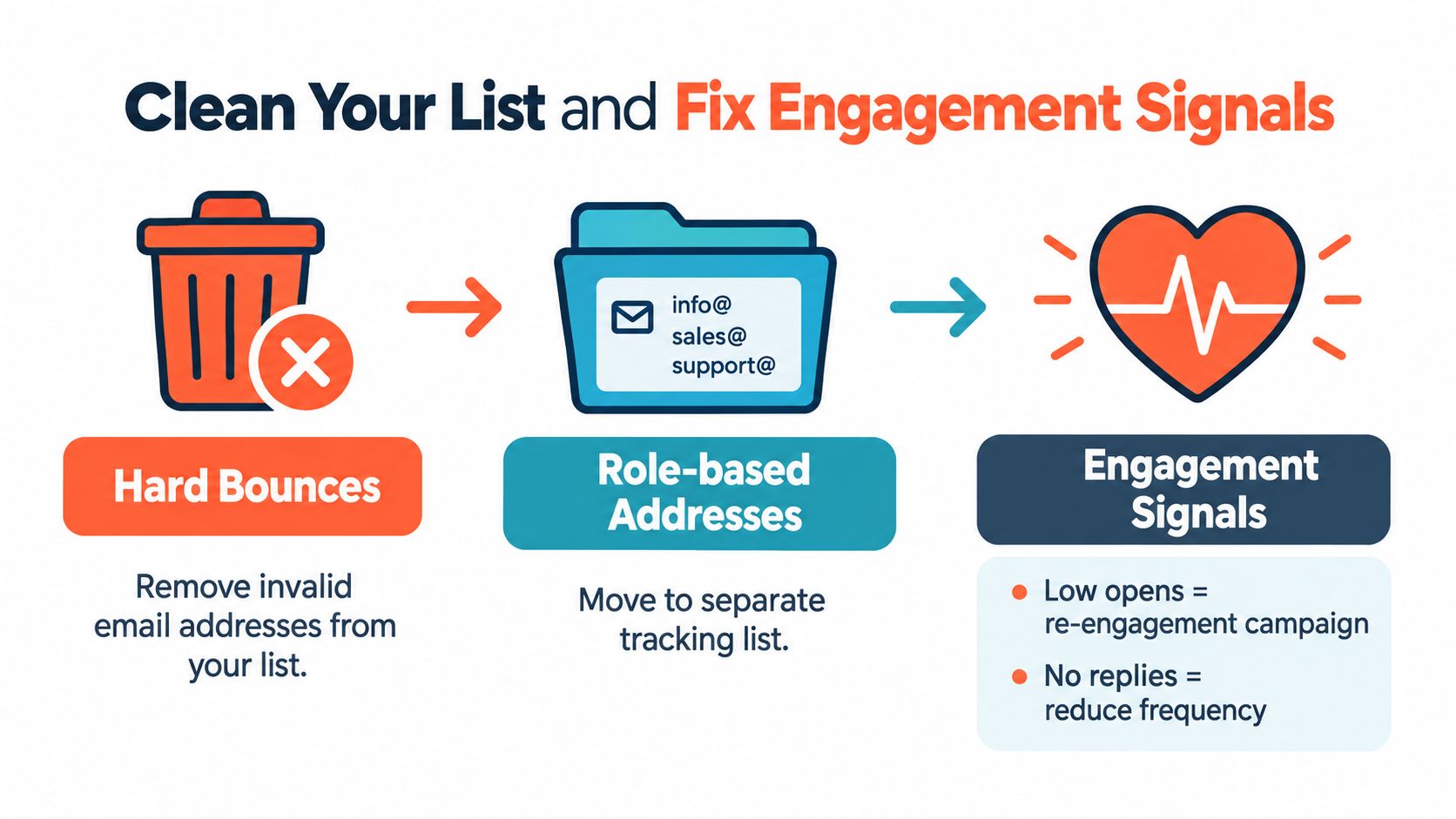
A stale list creates quiet damage. Invalid addresses increase bounces, unresponsive contacts dilute engagement, and role-based inboxes can produce complaints or low interaction. The sending team should treat list maintenance as part of infrastructure, not as a campaign cleanup task.
The 2025 Unspam benchmark reported that 39% of senders rarely or never performed list hygiene, while 13% of emails contained broken or unreachable links and only 46% passed subject-line quality checks. Those findings appear in the Unspam 2025 deliverability benchmark, and they reinforce a practical point: quality problems exist beyond subject lines.
Apply suppression rules immediately
- Hard bounces: Suppress immediately. A dead mailbox won't become valid because the campaign retries.
- Soft bounces: Retry up to three times, then suppress if the address continues to fail.
- Role-based addresses: Separate addresses such as
info@,sales@, andsupport@into a lower-priority tracking group. - Dormant contacts: Route contacts with no opens or clicks in 90 days into re-engagement rather than continuing the normal sequence.
- Long-term inactivity: Send a win-back campaign to contacts inactive for six months, then remove those who don't respond.
- Spam traps: Suppress any identified trap immediately and investigate how the address entered the database.
- New captures: Use real-time verification at the point of collection. Syntax checks alone don't confirm that a mailbox exists.
Engagement signals need a clear owner. Replies and meaningful clicks are more useful than a large list with no interaction, while repeated inactivity should reduce contact frequency. Broken links also waste the engagement opportunity and can make a technically valid message look poorly maintained.
Aggressive pruning can feel uncomfortable because the visible list becomes smaller. The relevant question isn't how many records remain. It's whether the remaining audience receives wanted mail, interacts with it, and gives mailbox providers a healthier signal.
Run a Remediation Playbook When Reputation Cracks
A reputation decline calls for less sending, not more. Increasing volume to compensate for weak placement adds more unwanted signals while the root cause remains unresolved.
Triage the incident
Start with Google Postmaster Tools and the ESP dashboard. Compare domain and IP reputation, delivery errors, bounces, complaints, blocks, and authentication results against the established baseline. Then run the domain through a broad blocklist check with MXToolbox and record the result instead of relying on a single list.
Pause sending when the spam complaint rate exceeds 0.1% or when the unknown user rate exceeds 0.3%, following the operational thresholds summarized by Unspam. A bounce rate above 2% also warrants intervention, while a rate above 1% is treated as a warning sign in some deliverability guidance from the same source. These figures are action triggers, not proof of one universal provider rule.
Identify the trigger before resuming
Review the change log for:
- A new list upload or data source
- A sudden volume increase
- A new ESP, CRM, or tracking domain
- An SPF, DKIM, or DMARC change
- A new sequence, audience, or sending mailbox
- A blocklist appearance
- A change in unsubscribe or suppression handling
Once the likely trigger is known, fix that issue before testing again. Don't switch ESPs or IPs as the first response. Domain reputation and message patterns often follow the sender, so a new endpoint can hide the symptom without repairing the cause.
Re-warm with controlled traffic
Reduce volume to a stable warm-up level and send only to engaged recipients. Use seed tests regularly, check provider-specific placement, and increase only when the evidence supports it. If a blocklist such as Spamhaus is involved, document the remediation, verify that the cause is removed, and submit a delisting request with specific supporting evidence.
Incident rule: Pause, diagnose, repair, and re-warm. “Send harder” is not a recovery strategy.
Monitoring Cadence, FAQ, and Final Checklist
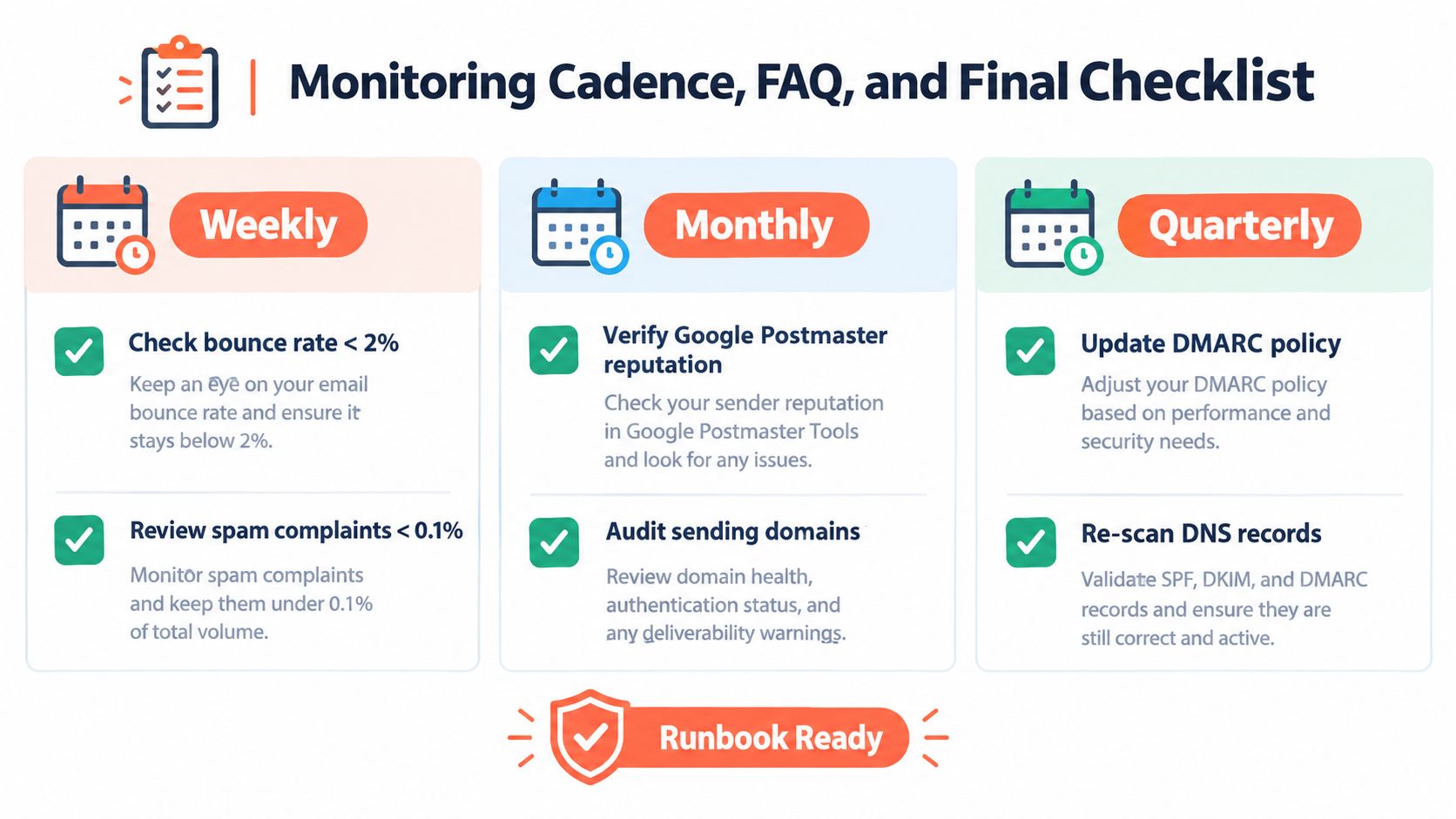
Deliverability stays healthy when monitoring becomes routine work rather than an emergency project. A compact runbook should assign an owner for authentication, list quality, provider dashboards, and incident response.
A practical cadence
- Weekly: Review bounce rate, complaint rate, provider errors, seed placement, and recent volume changes.
- Monthly: Check Google Postmaster reputation, audit sending domains and vendors, inspect suppression rules, and compare the current baseline with prior periods.
- Quarterly: Re-scan DNS records, review DMARC reports, rotate authentication keys where appropriate, and prune dormant subscribers.
Questions that come up during incidents
How fast does reputation recover?
There isn't one reliable timetable. Recovery depends on the cause, the depth of the decline, provider-specific signals, and whether the sender stops producing the same complaints and bounces. The safest approach is controlled traffic to engaged recipients with frequent measurement.
Will switching ESPs fix the problem?
Usually not. A provider change may correct an infrastructure defect, but it won't repair poor list quality, weak authentication, or a damaged domain reputation by itself.
What if only Gmail placement drops?
Treat it as a provider-specific investigation. Compare Gmail seed results with Outlook and Yahoo, inspect Google Postmaster data, and look for a change affecting Gmail traffic rather than changing the entire program blindly.
What should happen after a blocklisting?
Pause the affected traffic, identify the source, remove the cause, document the remediation, and request delisting through the relevant list. Resuming unchanged sending can recreate the listing.
Final runbook
- Authentication: SPF has one valid record, DKIM signs every sending stream, DMARC alignment passes, and aggregate reports have an owner.
- Sending patterns: Volume changes are logged, new domains ramp gradually, and dedicated outreach subdomains are separated from transactional traffic.
- List hygiene: Hard bounces are suppressed, soft bounces are reviewed, role accounts are segmented, spam traps are removed, and dormant contacts enter re-engagement or sunset flows.
- Monitoring: Postmaster Tools, SNDS, ESP alerts, seed tests, and blocklist checks are reviewed on a defined cadence.
Eludic can handle cold email infrastructure, SPF, DKIM, and DMARC setup, inbox warming, sender reputation monitoring, bounce and complaint alerts, list building, compliance controls, reply handling, and meeting coordination as a managed outbound service. Visit Eludic to see how a B2B team can outsource the operational work behind deliverability while keeping its focus on qualified conversations.