

A founder has a solid offer. The list was cleaned. The copy sounds human. Subject lines were tested. Then the campaign goes out, and the result is eerie silence.
The easy conclusion is that the messaging missed. Maybe the angle was weak. Maybe the call to action felt flat. Maybe the market just wasn't interested.
Sometimes that's true. But a lot of cold email problems start earlier than copy. They start at the mailbox door, where Gmail, Outlook, and Yahoo decide whether a message deserves trust before a prospect ever reads line one.
That hidden trust layer is what people usually mean when they talk about a sender reputation score.
It's one of the most misunderstood parts of outbound because most founders meet it only after something breaks. They hear that the score is low, or a tool flashes a warning, and suddenly everyone starts throwing around terms like domain reputation, IP reputation, authentication, warm-up, and complaint rate. The advice gets technical fast, and none of it answers the practical question: what should a B2B team fix first?
That's where this gets simpler than it sounds.
A sender reputation score is less like a single grade and more like a set of trust signals that different mailbox providers interpret in different ways. That's why one dashboard can look fine while another platform hints at trouble. It's also why comparing outreach tools alone doesn't solve deliverability. Founders shopping for platforms often benefit from seeing how sales engagement tools compare because tooling affects workflow, but tool choice only matters after the sending setup has earned trust.
Introduction Why Great Cold Emails Still Land in Spam
A cold email can be thoughtful, relevant, and personalized and still disappear into spam.
That feels unfair at first. The sender did the visible work. The prospect never saw any of it.
The invisible gate before copy
Mailbox providers don't begin by judging whether the email is clever. They begin by asking whether the sender looks trustworthy. If the answer is shaky, the message may land in spam, get buried, or get rejected before the content matters.
That's why a campaign can fail even when the writing is strong.
A simple analogy helps. Sending a cold email is a little like showing up at a building with a visitor badge. The message itself is what gets said in the meeting. Sender reputation is whether security even lets the sender into the lobby.
Great copy can't rescue an email that never reaches the inbox.
Why founders get misled
Most founders naturally focus on the parts they can see.
They rewrite intros. They tweak offers. They add personalization. They switch sending tools. Those can help, but they won't solve a trust problem created by bad list hygiene, unstable sending patterns, or missing technical setup.
The frustrating part is that sender reputation doesn't always announce itself clearly. One inbox may still perform fine while another starts filtering aggressively. Replies might drop before open tracking looks strange. A campaign can feel “partly broken,” which leads teams to change five things at once and learn nothing.
That confusion gets worse in multi-domain outbound. One domain may still be healthy. Another may already be carrying a weak reputation. Looking at the whole program as one lump hides the issue.
What this really comes down to
Founders don't need to become deliverability engineers. They need a practical way to think about trust.
That starts with three ideas:
- Reputation comes before copy: Mailbox providers evaluate the sender before they evaluate the pitch.
- There isn't one universal score: Different providers use different signals and dashboards.
- The fastest fixes are usually operational: Bounce suppression, complaint prevention, authentication, and stable cadence often matter more than another copy rewrite.
Once that clicks, the whole subject gets less mysterious. The next step is understanding what the sender reputation score represents, and why the number shown in a tool is only part of the story.
What a Sender Reputation Score Actually Means
A founder checks a deliverability tool, sees a sender reputation number in the yellow range, and assumes every mailbox provider now sees the domain the same way. That is where confusion starts.
A sender reputation score is a shorthand for trust, but it is not one universal grade shared by every inbox. It is closer to a set of overlapping report cards. Gmail keeps its own view. Outlook keeps its own view. Yahoo keeps its own view. Outside tools can summarize the picture, but they do not make the placement decision inside those inboxes.
The credit score comparison helps if you use it carefully.
A credit score works like a quick trust estimate based on past behavior. Sender reputation works in a similar way. Mailbox providers look at patterns over time and ask a simple question: does this sender behave like a legitimate business, or like someone creating unwanted mail at scale?
The difference is that email has no single bureau. Google Postmaster Tools gives insight into how Gmail views your sending domain, which is useful because it shows provider-specific reputation instead of pretending one number explains everything.
That distinction matters more in B2B outbound than many teams realize.
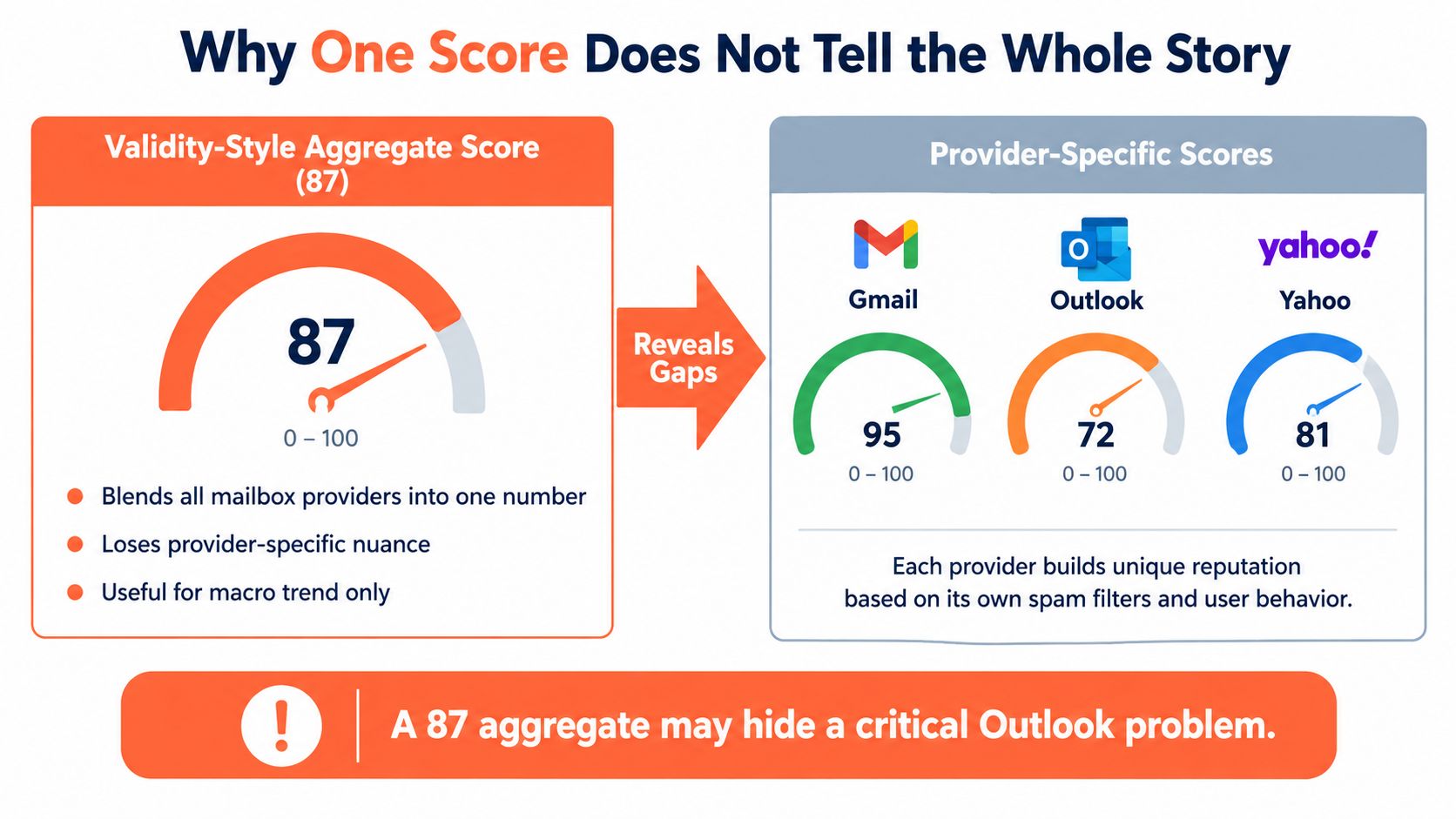
Cold outbound often targets mixed audiences. Startup founders may use Gmail. Mid-market and enterprise buyers often sit on Microsoft 365 or Outlook. If Gmail delivery looks stable but Outlook starts filtering, an average score can hide the problem. The opposite can happen too. A low aggregated score may be a lagging indicator after one provider has already cooled on your mail while another still treats it normally.
Three terms usually get blurred together:
- Domain reputation is trust tied to your sending domain.
- IP reputation is trust tied to the infrastructure sending the mail.
- Aggregate scores are outside summaries built to give you one easy number.
Those signals are related, but they answer different questions.
If you run multi-domain outbound, this gets even more practical. One domain can be healthy with Gmail while another struggles with Outlook. Looking only at a blended score is like checking the weather for an entire country when you only need to know whether it is raining in the city you are about to visit.
A better mental model is this: your sender reputation score is a dashboard summary, not the inbox provider's final verdict.
For B2B senders, the useful question is not “Is my score good?” The useful question is “Which provider is shaping results for this audience, and what is that provider seeing?” That is how the score becomes something you can act on instead of just worry about.
How Your Sender Reputation Score Is Calculated
A founder sends 200 cold emails on Monday. Gmail replies look normal. Outlook starts sending messages to junk. By Friday, an aggregated reputation tool finally shows a drop.
That sequence is common because sender reputation is not one universal grade handed down to everyone at once. It works more like several report cards written by different teachers, each watching slightly different behavior. Gmail, Outlook, Yahoo, and filtering vendors all build their own view of your sending based on the signals they can see.
So how is that view formed?
Mailbox providers watch your sending the way a bank watches card activity. One purchase at a grocery store looks ordinary. Ten purchases in ten cities within an hour looks suspicious. Email systems do something similar. They do not judge one message in isolation. They look for patterns over time and ask a simple question: does this sender behave like a legitimate business, or like someone forcing unwanted mail into inboxes?
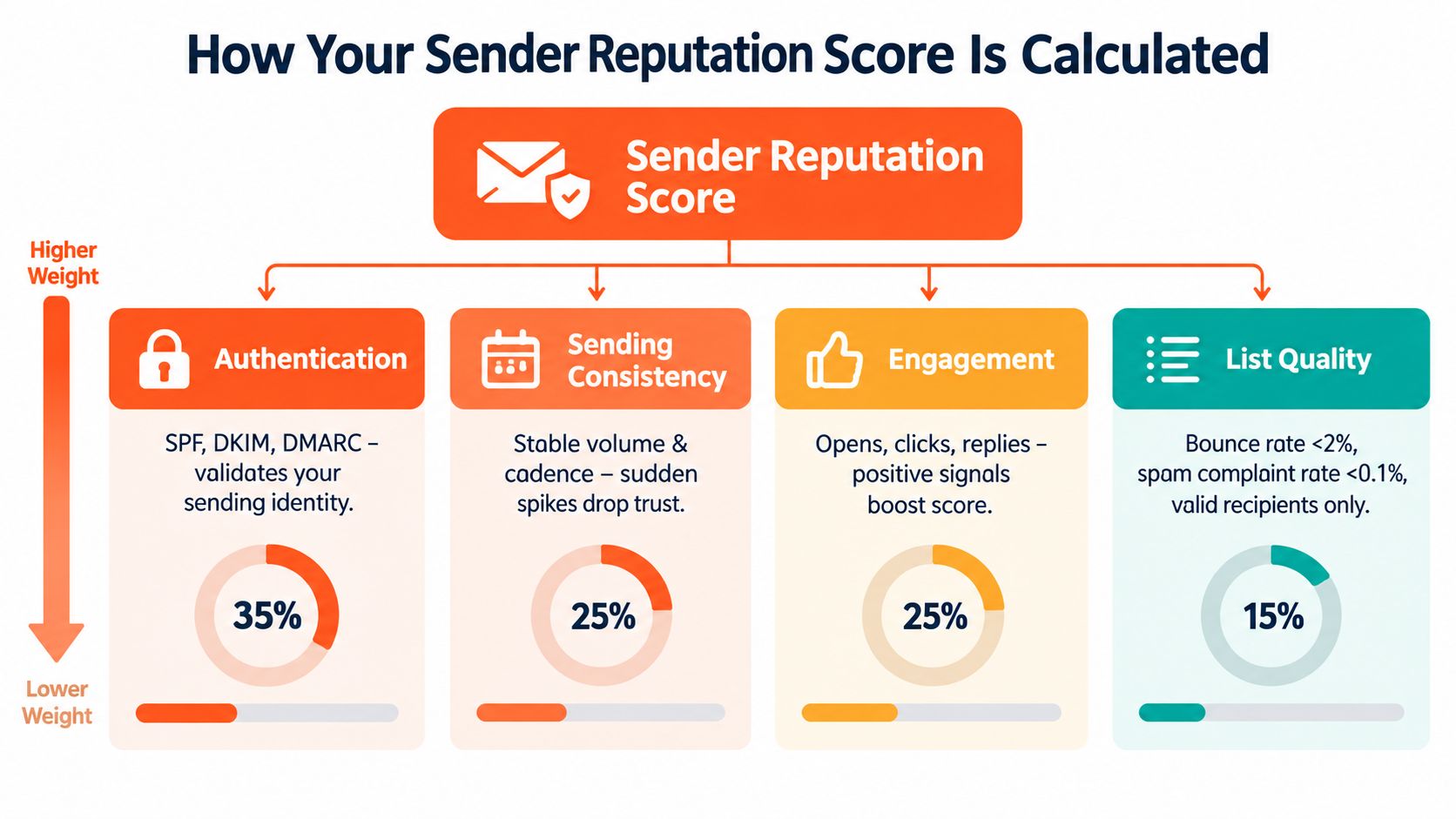
Four groups of signals shape that judgment.
Authentication answers the identity question. If your setup proves that your domain really sent the message, trust starts higher. If those records are missing or misconfigured, filters have less reason to believe you. Founders who want the plain-English version can review email authentication protocols, because this is the layer that confirms the message is from the domain shown in the From line.
Sending consistency shows whether your behavior looks stable. A steady rhythm is easier to trust. Big jumps in volume, long periods of silence followed by sudden activity, or shifting patterns across inboxes can look unnatural.
Recipient response shows whether people seem to want your mail. Opens are only one tiny clue, and often an unreliable one. Stronger signals are replies, messages moved out of spam, messages ignored, or messages marked as junk. Different providers weigh these signals differently, which is why a B2B sender can look healthy in one place and weak in another.
List quality shows whether you control who you contact. Sending to invalid addresses, recycled inboxes, or old data makes you look careless. Mailbox providers do not see a bad spreadsheet. They see a sender creating avoidable problems.
Some signals move slowly. Others can hurt fast.
The fastest damage usually comes from events that are hard to excuse:
- Hard bounces: the address does not exist or cannot receive mail
- Spam complaints: the recipient actively says your message is unwanted
- Spam-trap hits: your acquisition or cleanup process is weak
- Abrupt volume spikes: your sending pattern changes too quickly to look normal
These signals carry extra weight because they are direct evidence, not a guess about intent.
For B2B outbound, the practical lesson is easy to miss. A low aggregate score often shows up after provider-specific filtering has already started. If your ideal customers mainly use Microsoft 365, Outlook-related signals deserve more attention than a blended number. If you sell to startup operators living in Google Workspace, Gmail behavior often matters first. The “score” you see in a dashboard is often the smoke, not the spark.
A simple way to read the calculation is this:
| Signal type | What a mailbox provider may conclude |
|---|---|
| Authentication setup | This sender is who they claim to be, or they are hard to verify |
| Sending pattern | This sender behaves predictably, or changes too sharply |
| Recipient reactions | People welcome these emails, ignore them, or reject them |
| Bounce and complaint rate | This sender manages data carefully, or sends to risky lists |
A sender reputation score is the summary of those repeated judgments. It is built from identity, behavior, and recipient reaction, then interpreted separately by each provider that receives your mail.
Benchmarks That Matter and What Good Looks Like
A founder checks a reputation dashboard and sees a score of 78. That can feel safely close to 80. Then replies from Gmail prospects stay steady while Microsoft 365 accounts suddenly go quiet.
That disconnect is the point.
Benchmarks help, but only if you use them the right way. A blended score is useful for trend-watching. It is much less useful for explaining why one provider starts filtering you before another does.
A widely cited benchmark
A widely cited benchmark is Validity's Sender Score, which rates senders from 0 to 100. In that model, 80+ is generally viewed as strong, while 70 or below often lines up with deliverability trouble, according to Sender Score's benchmark page.
The same source also shows that delivery does not decline in a smooth straight line as the score falls.
| Sender Score Band | Average Delivered Rate |
|---|---|
| 91 to 100 | 91% |
| 71 to 80 | 42% |
| 61 to 70 | 24% |
| 51 to 60 | 15% |
| 1 to 10 | 1% |
That table explains why a moderate-looking drop can hurt so much. Reputation works less like a classroom grade and more like credit with different lenders. Once trust slips, access gets tighter fast.
What “good” looks like in practice
For B2B outbound, “good” does not mean chasing one perfect number.
It means three things are true at once:
- Your aggregate score stays in a healthy range or trends upward
- Your main mailbox-provider audience is still accepting and engaging with mail
- Your negative signals, especially bounces and complaints, stay controlled enough that trust keeps building instead of eroding
That last point trips up a lot of teams. A score can still look decent while one provider has already started to cool on your traffic. If your buyers mostly live in Google Workspace, Gmail behavior deserves first attention. If your pipeline depends on corporate Microsoft 365 inboxes, Outlook-related outcomes deserve more weight than the blended number on a dashboard.
Why small drops deserve attention
A five-point decline does not always mean a crisis. It can mean the underlying provider signals have already changed.
That is why outbound teams should treat benchmarks as an early warning range, not a diagnosis. The score tells you that trust may be weakening. It does not tell you whether the trigger was a list-quality problem, a volume change, weaker engagement from one provider, or a setup issue.
Teams that want that fuller picture usually need to track more than one summary number. A working set of email deliverability metrics helps you connect the score to the behavior behind it.
Which benchmark should a B2B sender trust
Use the benchmark that matches the decision you need to make.
Use an aggregate score to answer, “Are we trending in the right direction over time?” Use provider-specific tools and inbox results to answer, “Why are Gmail or Outlook placements changing right now?”
A simple rule set helps:
- Use aggregate score bands for trend checks
- Use provider-level signals for diagnosis
- Treat declines as lagging indicators when one provider already shows trouble
- Protect list quality and complaint rate before increasing volume
The practical question is not, “Is 78 good or bad?” It is, “Which provider is still trusting us, which one is pulling back, and what changed first?”
Why One Score Does Not Tell the Whole Story
A founder checks a deliverability dashboard, sees a decent sender score, and assumes the system is healthy. Then replies from Gmail leads slow down while Microsoft 365 prospects still answer. The score did not lie. It just blended two very different stories into one number.
That is the core problem with treating sender reputation like a single credit score. In practice, reputation works more like a patchwork. Gmail has its own signals, Outlook has its own signals, and each provider can pull back trust for different reasons and on a different timeline.

Aggregate score versus provider signals
An aggregate score is still useful. It gives you a blended trend, similar to checking your company's total revenue without looking at which product line is growing or slipping.
Mailbox providers do not make filtering decisions from that blended view. They use their own rule sets. Google Postmaster Tools, for example, shows a simple Pass or Fail view for key requirements like authentication, unsubscribe handling, and spam rate, while Sender Score style tools summarize trust on a 0 to 100 scale. Even the definition of a “healthy” score varies across tools and guides, as noted in MessageFlow's deliverability outlook.
So a blended score can look stable while one provider is already losing confidence.
How to prioritize Gmail versus Outlook
For B2B outbound, provider priority should follow your buyer mix.
If your list is full of founders, agency owners, consultants, and smaller software teams, Gmail often deserves first attention. That is where a large share of those conversations live. If your list targets finance, operations, procurement, IT, or larger corporate accounts, Outlook and Microsoft 365 signals usually carry more weight.
This is why equal attention across every provider can waste time. A team selling into startups may need to treat a Gmail dip as urgent even if Outlook still looks fine. A team selling into enterprise may make the opposite call.
A simple way to frame it is this: optimize where your pipeline comes from.
When a low aggregate score is a lagging indicator
This part trips people up.
A low aggregate score is often late to the story. By the time the blended number falls, one provider may have been showing weaker placement or stricter filtering for days or weeks. Stronger performance elsewhere can mask that early problem.
The reverse can happen too. A sender sees a weaker overall number, panics, and starts changing everything, even though Gmail inbox placement is still steady and the issue is concentrated in one provider or one domain. That kind of overcorrection can create new problems.
A better approach is to treat the aggregate score as a smoke alarm, not the fire report. It tells you to inspect the house. It does not tell you which room is smoking.
If Gmail is still passing key checks but replies from Outlook-heavy accounts are dropping, investigate Microsoft-facing signals first. If Outlook looks normal but Gmail promotions or spam placement is rising, focus there first. The blended score matters less than the provider that controls the leads you care about most.
One number can summarize direction. It cannot explain trust at the mailbox level.
How to Monitor and Improve Your Score for B2B Outbound
Once a team stops treating sender reputation as a mystery number, improvement gets much more operational.
The goal isn't to chase vanity metrics. The goal is to maintain trust across the providers that matter most to the pipeline.

Build a simple monitoring routine
A good routine doesn't need to be fancy. It needs to be consistent.
For most B2B outbound programs, the weekly checklist should include:
- Check provider-specific dashboards: Review how major mailbox ecosystems are reacting, not just one aggregate score.
- Watch bounce patterns closely: Unknown users and hard bounces usually point to list problems, not copy problems.
- Review complaint signals: Even a small pattern of negative recipient feedback deserves attention.
- Look for uneven domain performance: One domain can weaken while others stay healthy.
Strict suppression matters. If an address hard bounces, it shouldn't keep re-entering sequences through imports, CRM syncs, or multiple sender accounts.
Improve the behaviors that providers reward
A sender reputation score improves when the sending program becomes more disciplined.
That usually means tightening a few core habits:
-
Keep cadence stable
Providers trust patterns more than bursts. New inboxes and domains need a measured start, then a steady rhythm. -
Warm new assets properly
Teams launching fresh domains should treat warm-up as reputation building, not as a box to tick. Founders who need the operational version can review how to warm up an email domain before any major ramp. -
Protect list quality aggressively
If bad addresses are entering the system, volume should pause long enough to fix acquisition, verification, or suppression rules. -
Maintain authentication
Authentication isn't a one-time setup to forget. It needs to stay aligned as tools, domains, and sending flows change.
Know when to pause and when to push through
Not every performance dip requires stopping campaigns.
If one provider shows a mild warning but bounce and complaint behavior remain clean, the better move may be to hold volume steady and monitor closely. If hard bounces rise, complaints increase, or one domain starts behaving very differently from its peers, traffic should usually pause on the affected asset while the root cause gets fixed.
That's where many founders make the expensive mistake. They react to weak results by sending more, rotating faster, or spinning up extra inboxes. That can spread the problem instead of solving it.
A healthier operating mindset looks like this:
| Situation | Better response |
|---|---|
| Stable metrics but soft replies | Revisit targeting or copy |
| Bounce issues increasing | Fix data quality and suppression first |
| One domain underperforming | Isolate that domain and inspect setup and traffic |
| Mixed provider signals | Prioritize the provider your audience uses most |
Strong sender reputation usually comes from boring discipline. Clean lists, stable cadence, working authentication, and fast suppression.
That may not sound glamorous, but it's how outbound stays usable month after month.
Putting It All Together and Protecting Your Outbound Pipeline
A sender reputation score makes more sense once it stops being treated like a magic number.
It's a trust record. Different mailbox providers build that record in different ways. Some tools summarize it with a single score, but real inbox placement still depends on provider-specific signals, compliance, engagement quality, and sending behavior over time.
The credit-score analogy still holds up here. Trust builds slowly. It can weaken quickly. And recovery is usually harder than prevention.
For a B2B outbound team, the cleanest decision rule is this:
- Monitor provider-specific signals before obsessing over one aggregate number
- Keep complaints and hard bounces as close to zero as possible
- Favor consistency over sudden volume pushes
- Treat a low aggregate score as a clue, not a complete diagnosis
That last point matters most.
A weak numerical score may reflect a real problem. It may also lag behind what's happening inside Gmail or Outlook right now. The score becomes useful when it's paired with the question, “Which provider is causing the pipeline risk?”
Founders don't need to master every technical detail to act on this. They only need a clear order of operations. Check the providers that matter most to the audience. Isolate weak domains. Fix hygiene before scaling. Protect trust before chasing more send volume.
That's what keeps strong outreach from turning into invisible outreach.
Eludic runs cold email the way most founders wish it worked from the start. It handles the infrastructure, authentication, warm-up, deliverability monitoring, copy, sending, replies, and meeting booking so teams don't have to piece together a fragile outbound system on their own. To see how that works in practice, visit Eludic.