

Most advice about email delivery best practices starts and ends with three DNS records. Publish SPF, add DKIM, set DMARC, and the checklist is supposedly complete. That advice is useful, but it's also the reason many B2B teams mistake technically accepted mail for mail that buyers actually see.
A receiving server can accept a message while a mailbox provider routes it to spam, promotions, or another filtered location. Industry coverage citing a 2026 benchmark reported global inbox placement at 87.2%, while another 2026 report placed the global average at 83.5% in 2024, with 6.7% landing in spam and 9.8% disappearing entirely (Lemlist's inbox placement analysis). The practical conclusion is uncomfortable: roughly one in six legitimate commercial emails can fail to reach the inbox.
Authentication gets a sender into the game. Sender reputation determines whether the message stays visible.
Why Email Delivery Is a Visibility Problem, Not a Setup Problem
SPF, DKIM, and DMARC are table stakes for outbound email, not a finish line. A 2026 Mailgun survey found that 66% of senders knew they used both SPF and DKIM, while 71% of organizations sending more than 100,000 emails per month knew they used DMARC, an increase of 11% from the prior year (Mailgun's email authentication findings). Authentication is now common enough that it offers limited differentiation by itself.
Mailbox providers continuously assess authentication, volume, list quality, complaints, and recipient engagement. A new domain that sends unpredictably to stale contacts can lose placement despite clean records. A stable program sends wanted mail, suppresses uninterested recipients, and keeps volume believable, giving providers stronger behavioral evidence.
Practical rule: Treat authentication as permission to send, then operate reputation as a live system every day.
That rule changes launch decisions. Warm-up is not a disposable phase, list hygiene is not an annual spreadsheet exercise, and cadence is not just a sales manager's preference. Each input influences where the next message appears.
Teams building lightweight outbound workflows can review this guide to sending emails from Notion for practical context on turning a workspace into a controlled sending process. Convenience does not replace authentication, suppression, testing, or monitoring. Those controls keep an easy workflow from becoming an uncontrolled source of poor engagement.
Delivery and placement measure different outcomes. Delivery status shows whether a server accepted the message. Inbox placement shows where the provider put it afterward. A program that reports only delivery rate measures the easier half of visibility. Sender reputation must be managed through daily feedback, not marked complete after launch.
Setting Up SPF, DKIM, and DMARC the Right Way
Authentication records do not create a healthy sender reputation by themselves. They establish whether mailbox providers can verify your identity. Daily sending behavior determines what providers do with that identity.
SPF is the guest list, identifying which sending services may send for a domain. DKIM is the tamper-resistant seal, allowing the receiving provider to verify that the message was signed and not altered in transit. DMARC is the policy, telling providers how to handle mail that fails authentication or does not align with the visible From domain.
Build the records around alignment
SPF lives in DNS as a text record listing approved sending sources. The common failure is not always a missing vendor. It is leaving every historical platform, testing tool, and abandoned service in the record until it becomes difficult to maintain and risks exceeding the permitted lookup limit. Remove sources that no longer send mail, and review the record whenever your sending stack changes.
DKIM uses a public key published in DNS and a private key held by the sending system. The signature should represent the message identity, especially the From domain recipients see. A message can pass DKIM technically while still failing DMARC alignment if the signing domain differs from that visible address.
DMARC also belongs in DNS. It checks whether SPF or DKIM passes with the visible From domain, then applies the policy selected by the domain owner. A monitoring-only policy can expose unauthorized sources, but it does not tell providers to quarantine or reject suspicious mail.
Industry analysis has reported that DMARC adoption rose from 27.2% in 2023 to 52.1%, while more than half of adopting domains remained at p=none. That gap matters. Visibility shows that impersonation exists; enforcement gives providers an instruction for handling it.
Keep the implementation controlled
Use a deliberate sending architecture for each subdomain. Document legitimate senders, remove obsolete SPF includes, verify From-domain alignment, and use strong DKIM keys supported by your sending platform. Move toward an enforced DMARC policy, commonly p=quarantine, after legitimate sources have been identified and aligned. Review authentication reports regularly because a new vendor or forgotten workflow can change the result after launch.
| Protocol | What It Does | DNS Record | Common Mistake |
|---|---|---|---|
| SPF | Authorizes approved sending sources | TXT record | Adding too many competing includes |
| DKIM | Signs messages so providers can verify authenticity | Public key record | Signing with a misaligned domain |
| DMARC | Applies policy to authentication failures | TXT record | Stopping at monitoring with no enforcement |
For a technical reference comparing the records directly, see SPF, DKIM, and DMARC records. Correct setup is the starting point. The operating test is whether legitimate messages authenticate and align consistently across every real sending path.
Warming Up New Domains and Inboxes Without Tripping Filters
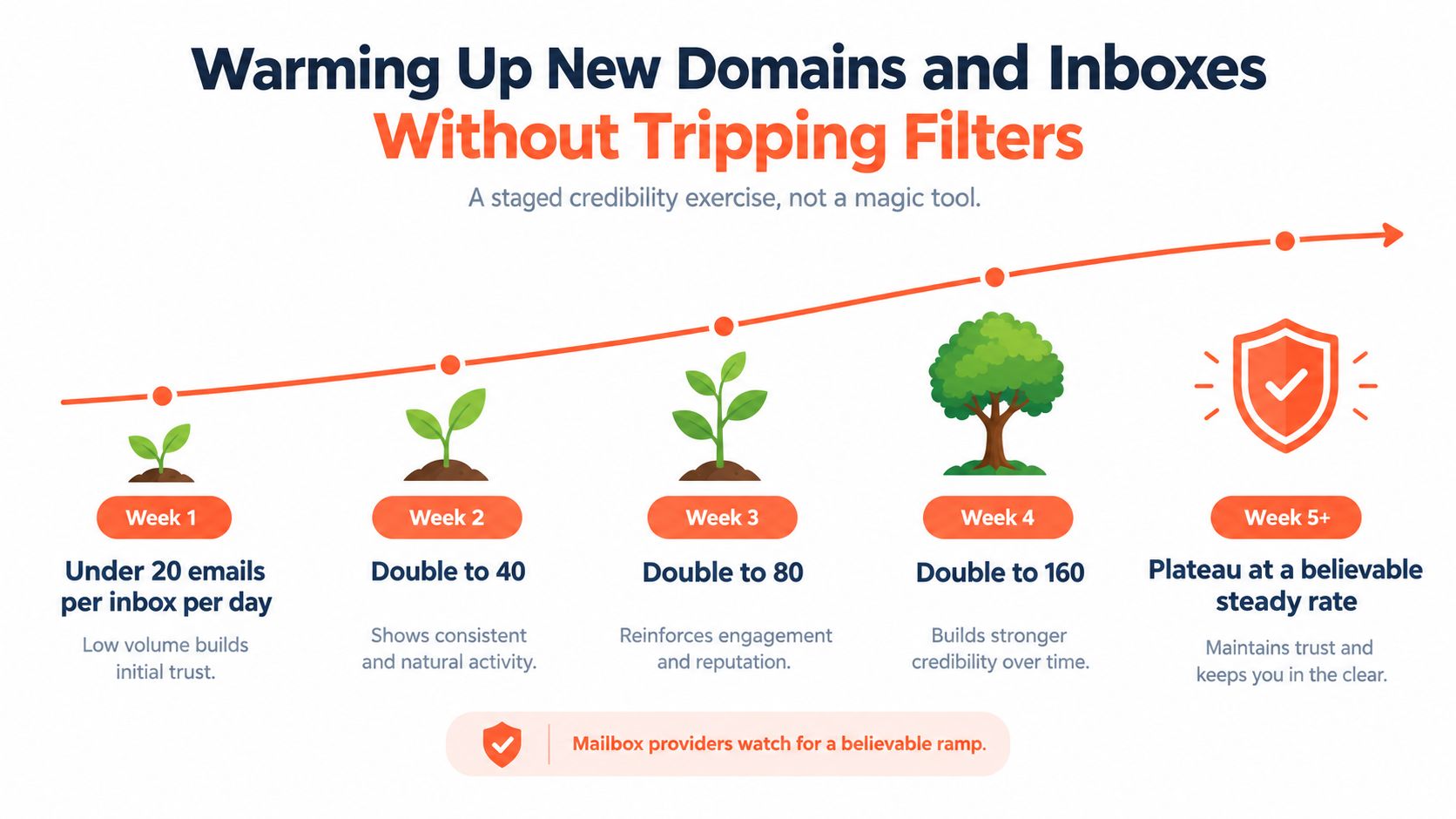
Warm-up isn't a magic switch that makes a new inbox trusted. It's a staged credibility exercise. Mailbox providers want to see a believable relationship between volume, recipient behavior, and sending history, not a cold domain suddenly producing a campaign burst.
A cautious ramp starts with under 20 emails per inbox per day in the first week, then increases gradually, with the visualization below showing a doubling pattern through later weeks. Those volume figures come from the prescribed operating template, not a universal provider rule, so teams should adjust them based on placement data and recipient engagement.
Make engagement look human
Real replies are more useful than empty activity. Teams can begin with known contacts, reply to controlled seed accounts, and use conversational tools only when those interactions reflect genuine behavior. Purchased warm-up networks create a trade-off: they may generate activity, but artificial conversations can produce misleading signals and expose the domain to questionable recipients.
New senders should avoid:
- Burst sending: Large batches from a new inbox look unlike normal one-to-one communication.
- Identical copy: Repeating the same message across many inboxes makes the program appear automated.
- Zero-response patterns: Messages that produce no replies, clicks, or other positive engagement provide weak evidence that recipients want the mail.
A practical ramp can begin with the lowest-volume cohort, expand only after placement remains stable, and plateau at a rate the team can sustain. The best guide to warm up an email domain is ultimately an operating plan, not a promise that software can manufacture trust.
The two-week version is simple: start with the most engaged or highest-confidence recipients, observe placement and replies, increase in small steps, and pause the ramp when complaints or spam placement rise. A new domain needs consistency more than speed.
List Hygiene, Decay Strategy, and the Hidden Cost of Bad Data
List hygiene is a reputation control, not a data-admin task. Hard bounces should be suppressed immediately because the address is not deliverable. Soft bounces need diagnosis, since temporary mailbox limits, outages, or full mailboxes may resolve, but repeated soft failures should eventually trigger suppression.
Complaint signals are even more sensitive. Independent guidance recommends keeping bounce rate below 2% and spam complaints below 0.1% (Mailtester's inbox placement guidance). The figures aren't a safe harbor for careless acquisition. A list with complaints near that level is already sending a warning to mailbox providers.
Role-based addresses create another problem. info@, sales@, and similar accounts may be monitored by several people, nobody, or an automated filter. Recycled spam traps can also sit inside old business data, and a list can look complete in a CRM while carrying serious reputation risk.
Track decay by segment
B2B data goes stale continuously. Job changes, company closures, domain changes, and changing responsibilities all reduce the chance that an old record reaches the right person. A list untouched for a long period doesn't merely preserve its original reach. It preserves its original errors and adds new ones.
Useful fields include:
- Source: Record where the address came from and what consent or business context supports outreach.
- Last engagement: Store the most recent meaningful reply, click, or other approved signal.
- Bounce history: Separate hard failures from temporary delivery problems.
- Suppression status: Keep unsubscribes, complaints, and invalid addresses out of future sends.
A sunset policy should move dormant contacts into suppression after a defined period, with a re-engagement attempt before removal where appropriate. The right interval depends on the program, but the decision must be automatic enough that inactive recipients don't remain indefinitely because nobody remembered the quarterly cleanup.
| Signal | Warning Threshold | Critical Threshold | Typical Cause |
|---|---|---|---|
| Bounce rate | Approaching 2% | Above 2% | Invalid or stale addresses |
| Spam complaints | Approaching 0.1% | Above 0.1% | Irrelevant, unexpected, or excessive mail |
| Hard bounces | Any recurring pattern | Continued sending after failure | Missing suppression logic |
These thresholds are operational guardrails, not targets. The strongest list is smaller, current, traceable, and easy to suppress.
Sending Cadence, Copy, and Engagement Signals That Move the Needle
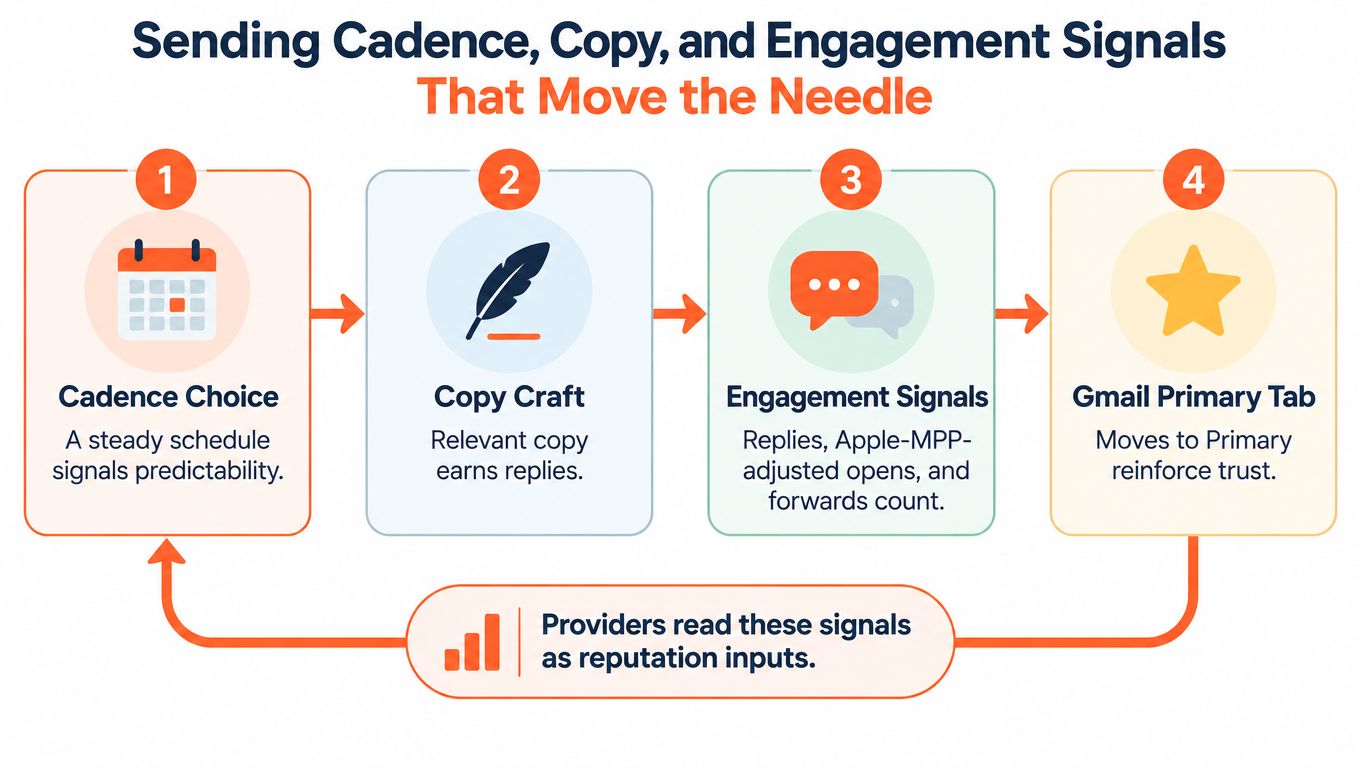
Mailbox providers read cadence and copy as behavioral inputs. A steady stream of relevant messages gives them a clearer pattern than a domain that disappears and then sends a large, uniform batch. Fresh infrastructure is especially vulnerable to abrupt volume changes because it has little history to offset an anomalous send.
For B2B outbound, a controlled starting point is 20 to 50 new contacts per inbox per day, with 2 to 4 touches spaced 3 to 5 days apart. These are practical operating ranges, not provider guarantees. Teams should reduce them when replies are weak, complaints rise, or placement differs sharply between providers.
Write for the recipient, not the filter myth
Spam words alone don't determine placement. A relevant message with a clear reason for contact can perform better than a carefully sanitized message that recipients don't understand or want. The practical copy choices still matter:
- Use a credible From line: A recognizable person and company context make the message easier to evaluate.
- Prefer restrained formatting: Plain text or light HTML generally fits one-to-one B2B communication better than a heavily designed promotional template.
- Keep links purposeful: A message crowded with links can look promotional, especially when the text provides little context.
- Avoid URL shorteners: Shortened domains hide the destination and can weaken trust.
- Write for replies: A focused question gives the recipient a reason to respond instead of deleting the message.
Open rates need careful interpretation because Apple Mail Privacy Protection can generate image activity that doesn't represent a human read. Replies, clicks, forwards, conversions, unsubscribes, and spam complaints provide stronger operational context.
A reminder sequence illustrates why cadence should follow recipient intent rather than a fixed blast schedule. Teams planning event outreach can use these webinar reminder sequences as a reference for spacing, clarity, and expectation-setting. The same principle applies to cold email: every follow-up should add context or value, not merely repeat the first ask.
Monitoring KPIs That Actually Predict Inbox Placement
A deliverability program needs a feedback loop connecting infrastructure, audience quality, message behavior, and provider outcomes. Authentication confirms the sender, warm-up establishes history, hygiene limits negative signals, and cadence controls the behavioral pattern. Monitoring shows which input is failing before the campaign results collapse.
Inbox placement is the leading visibility metric. Measure it with seed lists across Gmail, Outlook, and Yahoo, and separate inbox, spam, promotions, tabs, and missing messages where the testing system allows. A delivery report cannot provide that view.
Use provider data alongside campaign data
Google Postmaster Tools and Microsoft SNDS can reveal provider-specific reputation and complaint signals. DMARC aggregate reporting helps identify unauthorized or misaligned sending sources. Campaign systems add hard bounces, replies, unsubscribes, and recipient complaints.
A useful weekly review asks four questions:
- Did placement change by provider or remain stable?
- Did complaints or hard bounces rise for a particular segment?
- Did replies and clicks decline after a copy or cadence change?
- Which operational lever should change next, volume, targeting, content, or authentication?
The email deliverability metrics guide can help teams structure that review without treating a single dashboard number as the whole truth.
| KPI | Healthy Range (B2B Outbound) | Source | Operational Lever It Informs |
|---|---|---|---|
| Inbox placement | Above 80% to 85% | Seed testing | Volume and provider-specific routing |
| Bounce rate | Below 2% | Sending platform | Verification and suppression |
| Spam complaints | Below 0.1% | Feedback loops and ESP | Targeting, relevance, and cadence |
| DMARC adoption | Enforced policy preferred | DMARC reports | Authentication and spoofing protection |
| Reply rate | Stable or improving | Campaign platform | Audience and copy quality |
The inbox-placement range reflects guidance that healthy programs are generally expected to stay above 80% to 85%, while weaker programs can fall below 75% (Twilio's deliverability guide). It should be read as a diagnostic range, not a universal promise.
Recovering Sender Reputation When Placement Slips
A placement drop creates panic, and panic produces bad decisions. Teams often rewrite every email, switch sending platforms, buy another domain, and increase volume in search of more results. Those actions change too many variables at once and can conceal the actual cause.
Diagnosis comes first. Compare seed-test placement by mailbox provider, inspect complaint and bounce changes, review engagement by segment, and check whether a new sending source or authentication change coincided with the decline.
Don't change the tool before identifying the signal. A new platform won't repair a damaged list or erase domain history.
Follow an order of operations
- Pause high-risk segments: Stop sending to old, unverified, role-based, or weakly engaged contacts.
- Throttle volume: Reduce sending to 20% to 30% of baseline while collecting cleaner evidence.
- Scrub the affected audience: Suppress hard bounces, complaints, unsubscribes, and recipients with no credible engagement.
- Recheck alignment: Verify SPF, DKIM, and DMARC across every active sending source and confirm the visible From domain aligns.
- Resume with small cohorts: Send only to the strongest remaining audience and compare placement across providers.
- Ramp slowly: Increase volume only after the data shows sustained improvement.
The recovery period should be treated as a monitored operating cycle lasting 2 to 4 weeks, rather than a single campaign reset. During that period, watch spam placement by provider, reply-rate decline, unsubscribe velocity, hard bounces, and complaint movement.
The recovery rule is strict: require two consecutive clean days with at least 95% inbox placement at the lowest volume before beginning a ramp. That threshold belongs to the prescribed recovery playbook, so teams should validate it through seed testing and provider-specific results rather than assume it guarantees full restoration.
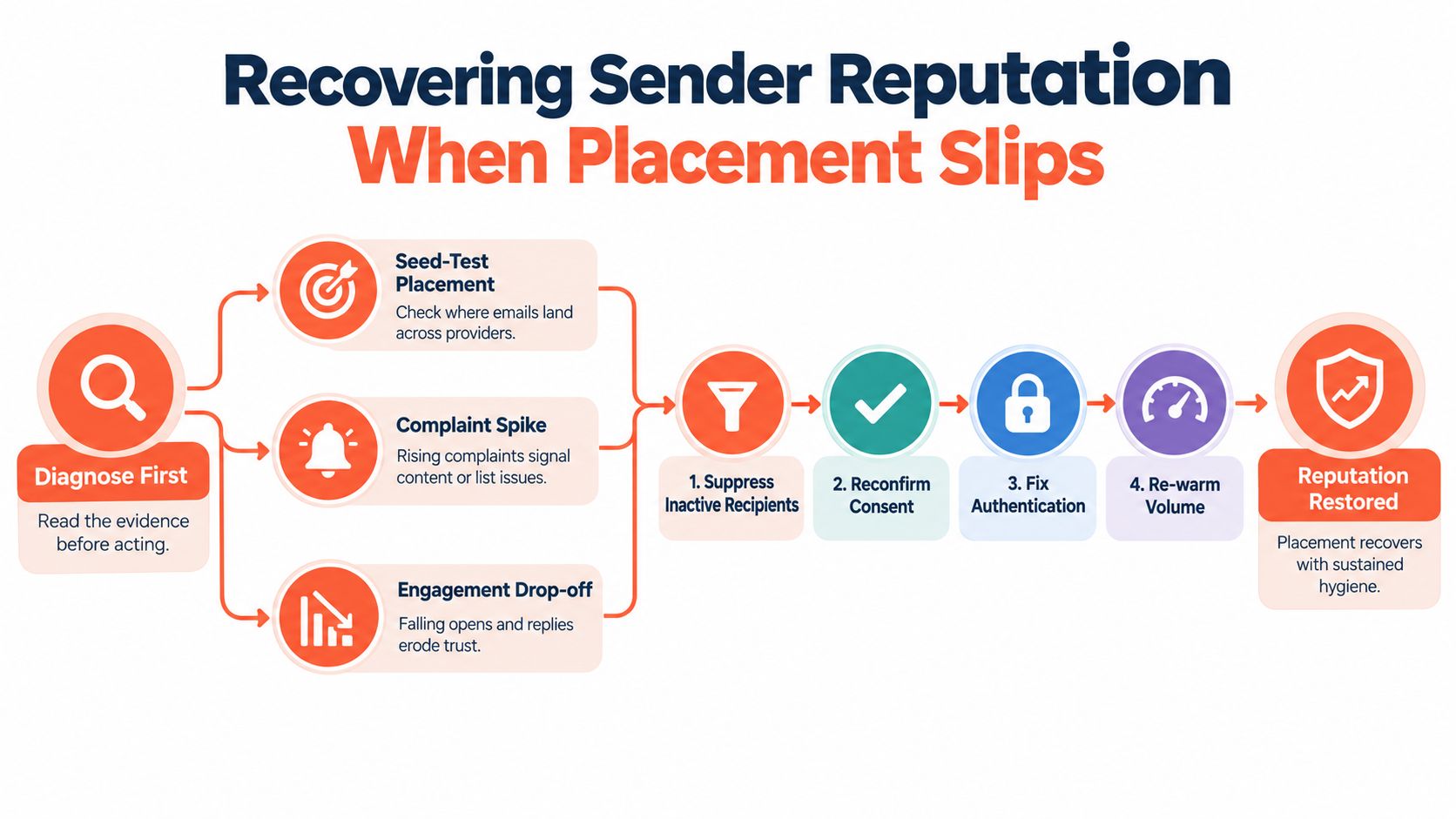
Recovery works when the sender removes the cause, sends less to better recipients, and gives providers consistent evidence over time. It doesn't come from cosmetic copy changes alone.
Compliance, Reporting, and the Long Game of Outbound Email
Compliance belongs inside deliverability operations because recipient control changes recipient behavior. Clear unsubscribe handling, accurate consent records, suppression lists, and an identifiable sender reduce the chance that a recipient uses the spam button as the easiest exit.
CAN-SPAM, GDPR, and CASL differ in scope and legal mechanics, but each creates practical operating requirements around identification, permission, transparency, and opt-outs. A physical address and functional unsubscribe process aren't just legal artifacts. They help recipients recognize legitimate mail and give uninterested people a clean way to leave.
| Requirement | CAN-SPAM (US) | GDPR (EU) | CASL (Canada) |
|---|---|---|---|
| Sender identification | Commercial messages must identify the sender accurately | Organizations must provide transparent identity information | Commercial messages must identify the sender and any party sending on its behalf |
| Consent basis | Commercial email must follow applicable opt-out requirements | Processing needs a lawful basis, with consent often relevant for marketing | Commercial electronic messages generally require consent, subject to defined exceptions |
| Unsubscribe | A clear opt-out mechanism is required | Objections and withdrawal requests must be respected | An unsubscribe mechanism must be included and honored |
| Records | Maintain suppression and opt-out handling | Keep records supporting the processing basis and requests | Retain evidence of consent and manage withdrawals |
| Operational focus | Accurate headers, clear commercial intent, and prompt opt-out handling | Purpose limitation, transparency, data rights, and documented governance | Consent evidence, sender identification, and reliable opt-out processing |
Turn reporting into operational memory
A useful weekly report should show placement trends by provider, complaint rate by campaign, hard-bounce movement, engagement by segment, unsubscribe velocity, and list decay. A sudden shift becomes actionable when the report can connect it to a campaign, audience source, template, or sending change.
The best teams can answer why placement dropped on a specific day without reconstructing the entire program from scattered exports. That requires consistent tagging, preserved suppression history, authentication monitoring, and a clear owner for each corrective action.
Compliance data then becomes a long-term asset. Every accurate opt-out, documented consent decision, and suppressed invalid address reduces future uncertainty. Reporting turns those records into decisions about who should receive mail, how often, and through which sending stream.
Eludic designs, launches, and manages done-for-you B2B cold email programs, including SPF, DKIM, and DMARC setup, inbox warming, reputation monitoring, list research, copy testing, reply handling, and compliance workflows. Visit Eludic to brief the team and build an outbound program where deliverability is operated continuously instead of checked once at launch.